10-Marble
September 29, 2025
Solved

Windchill Auto Associate missing during upload

  • September 29, 2025
  • 1 reply
  • 368 views

Version: Windchill 13.0


Use Case: Windchill Auto Associate missing during upload during upload of the CAD document.


Description:

Hello,

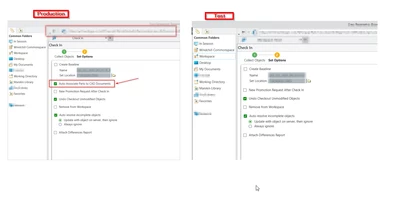
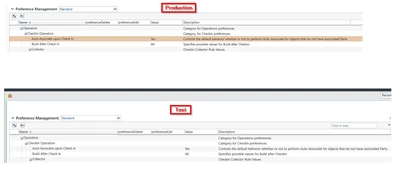
I have already set in the preferences management about the 'Auto Associate upon check in' for parts. This works perfectly in the production environment.

I can easily see the auto associate button in production environment.

Can you help me what is missing in the test environment the option for the 'auto associate parts' is missing on the test environment ?

When I check in the CAD part from Production Environment it automatically associates to CAD document.
But in the test environment its not present.

For reference, below are the screenshots.
RT_11397061_0-1759154655906.png


RT_11397061_0-1759155142483.png


Thank You in Advance.


Best answer by joe_morton

One thing to keep in mind is that this preference can be set at any level:

  • Organization
  • Context
  • User

So you'll want to check at all levels what the preference is set as. It's possible to have it set with the desired setting at Org or Context, and then the User may have it set differently!

1 reply

joe_morton
18-Opal
18-Opal
September 29, 2025

One thing to keep in mind is that this preference can be set at any level:

  • Organization
  • Context
  • User

So you'll want to check at all levels what the preference is set as. It's possible to have it set with the desired setting at Org or Context, and then the User may have it set differently!

10-Marble
October 1, 2025

Thank you so much for the details.