1-Visitor
September 12, 2013
Solved

Windchill common folders

  • September 12, 2013
  • 1 reply
  • 4727 views

Can you link a Windchill folder to the Creo "common folders" area.
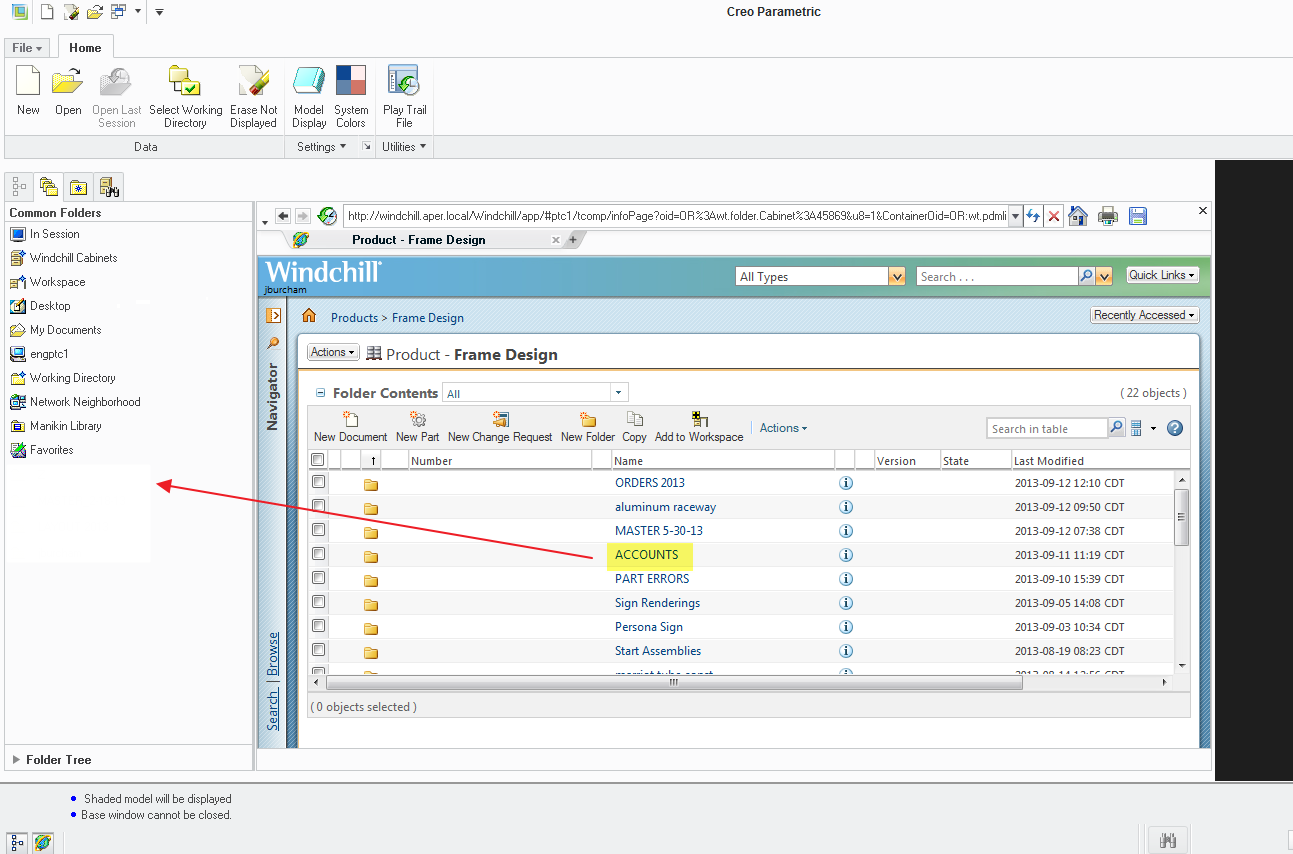
COMMON+FOLDERS.png

Best answer by LoriSood

As Bruno mentioned, Windchill folders can be added to Favorites under the Common Folders. Local folders can be added directly to Common Folders by right-clicking on them in the embedded browser and selecting "Add to common folders"

Refer to CS36355 for more information

1 reply

7-Bedrock
September 13, 2013

Hello James,

I don't know if you can add this directly to the common folders, but it is possible to add a folder to the Favorites.

Right click on the name of the folder (the folder needs to be open).

So in your example open the Accounts folder, click right on Accounts and slect Add to Favorites.

Then it is listed in the Favorites list.

So maybe this can be an alternative.

Regards

Bruno

LoriSood23-Emerald IAnswer
23-Emerald I
September 13, 2013

As Bruno mentioned, Windchill folders can be added to Favorites under the Common Folders. Local folders can be added directly to Common Folders by right-clicking on them in the embedded browser and selecting "Add to common folders"

Refer to CS36355 for more information

1-Visitor
November 30, 2021

Hello. Can you help me please? I need add folder to Common Folders, but when I click RMB and open context menu, the most of commands are not available. Maybe I need to change any parameters in config.* file?
