


Windchill - General Attributes section exceeded - Expand section easily?
Hello,
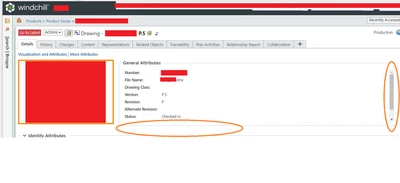
In Windchill on a file page, if the number of general attributes set to show exceeds the General Attributes section the display box resorts to scrolling rather than expanding the box. Is there an easy settings change or way to make this such that all the attributes are visible and perhaps the box is expanded, the distance between lines is lessened, or the font size is decreased, rather than resorting to scrolling? A single extra attribute was determined to be important and added to the list of visible attributes in that section but no one bothered to check if it would have any consequences anywhere else. Now one of the most important attributes and one that I look at 50+ times a day for different objects ) is hidden away.
I apologize if this is not the correct section for this or if this is a silly question. I'm not a Windchill admin or expert and am new to this forum. I'm just someone annoyed by the behavior of the system (or our system) and hoping to have a simple solution to poke IT with.
Thank you so much!