18-Opal
July 18, 2017
Solved

Windchill PDMLink The "Executable Not Safe" message is returned when attempting to start WVS

  • July 18, 2017
  • 4 replies
  • 4162 views

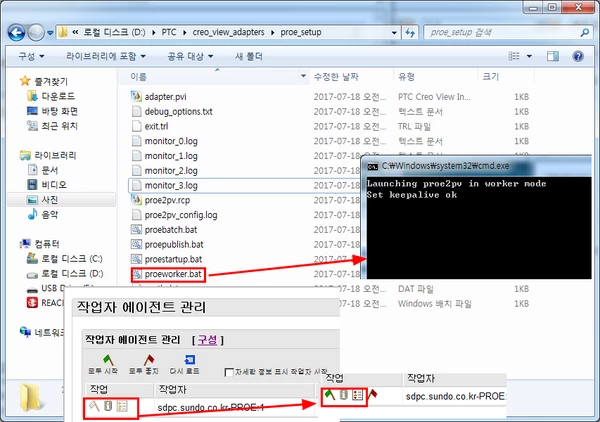
The flag in the worker agent management
It is displayed in white.
Document 'https://support.ptc.com/appserver/cs/view/solution.jsp?n=CS140965#_ga=2.85968985.1520012805.1500267831-1531925275.1499925517'
But I did not understand this
So double-click proeworker.bat in the installed path
The flag was green when I ran it.
Do I have to run them manually each time I run agent management?
Thank you for your reply.qqqq.png
Best answer by CHASEONHO

qqq.png

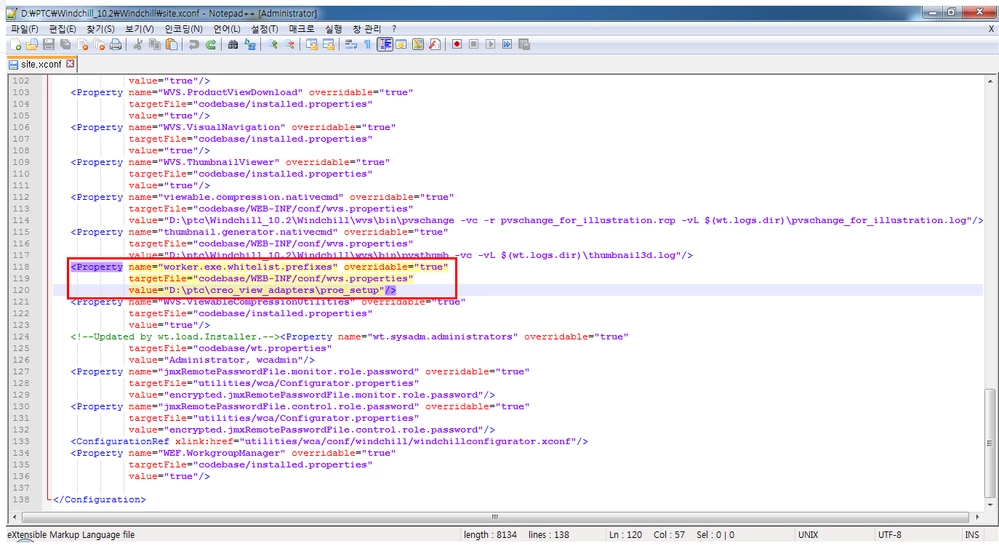
i Add sentence 

<Property name="worker.exe.whitelist.prefixes" overridable="true"
targetFile="codebase/WEB-INF/conf/wvs.properties"
value="D:\ptc\creo_view_adapters\proe_setup"/>

but flag was still white..

help me plz 

thank you

4 replies

12-Amethyst
July 18, 2017

It is not required to run the 'proeworker.bat' manually all the time. Just add the file path of the 'Proeworker.bat' in 'whitelist' property. Add the following Property in Site.xconf, propagate and Restart Windchill.


<Property name="worker.exe.whitelist.prefixes" overridable="true"
             targetFile="codebase/WEB-INF/conf/wvs.properties"
             value="D:\ptc\creo_view_adapters\proe_setup"/>

wvs.png


CHASEONHO18-OpalAuthorAnswer
18-Opal
July 19, 2017

qqq.png

i Add sentence 

<Property name="worker.exe.whitelist.prefixes" overridable="true"
targetFile="codebase/WEB-INF/conf/wvs.properties"
value="D:\ptc\creo_view_adapters\proe_setup"/>

but flag was still white..

help me plz 

thank you

12-Amethyst
July 19, 2017
Hi,

Did you propagate the properties and restart Windchill?