
3-Newcomer
February 29, 2016
Question

Windchill Quality Solutions Conversion Wizzard shows Invalid Objectname 'RelexDatabases'

  • February 29, 2016
  • 1 reply
  • 1098 views

Hi,

I made an update from WQS 10.2 to WQS 11 (parallel installation). Everything went fine, now I have a WQS 11 with an initial DB. But if I want to copy the content of 10.2 to my 11 instance with Windchill Quality Solutions Conversion Wizzard, I can do the steps only to the point "Database Server Selection". Then I get the error: Invalid Objectname 'RelexDatabases' See figure below.
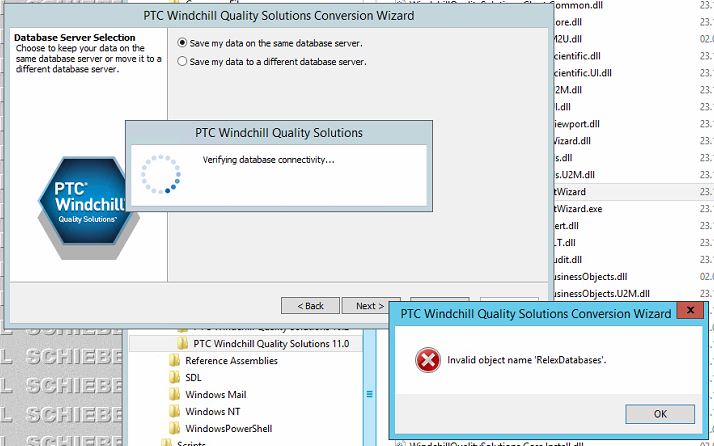
WQS_Convert_Error.JPG

Any idea? Thank you very much!!!

Update: According documentation setup should now ask for DBA credentials for the host and for the location where backup should be placed. But it asks nothing, just checks the database connectivity at once... The step between is missing...

1 reply

HiCoCPS3-NewcomerAuthor
3-Newcomer
March 2, 2016

Case seems to be solved. The main issue is, that a connectivity-check is done _BEFORE_ setup asks for the credentials!?! Maybe it takes the credentials of the db-user from the old version. If this user named eg "admin", it has a default schema called also "admin". Unfortunately, if you add the server role "sysadmin" to this user, the default schema changes to "dbo". So it looks for the table "dbo.RlexDatabases" instead of "admin.RelexDatabases". ( See MS-Article: Database Owner (dbo) ) After revoke the role "sysadmin" the user gets the original default schema again. Now the pre-check can be done, and the missed steps are coming.

Next issue: admin still db-owner, backup of previous DB is done, Quality110 deleted and created again by the script. Structure created also, but by one of the last steps an error message is coming:

Doesn't matter which way is chosen (auto/manual). So the setup breaks again...