10-Marble
March 18, 2024
Solved

Windchill Reporting on Problem Reports with Affected End Items (from Part Master)

  • March 18, 2024
  • 2 replies
  • 2565 views

Hi everyone.  I am trying to add Affected End Items to a "Problem Report" report with Report Builder (Windchill PDMLink 11.1).  I have successfully done the same for a "Change Request" report using the below guide but this does not work in the same way for Problem Reports.  Can anyone help?  I need to know what kind of join and any additional tables to go between the Problem Report table and the Part Master table.


(This is the link to the guide for Change Requests -> Affected End Items which works well.)

Affected End Items Part Master Report (ptc.com)


Thanks!


Francis.

Best answer by Fadel

Hi , I don't have other points on specific joints , but I will tell you how I found the link .

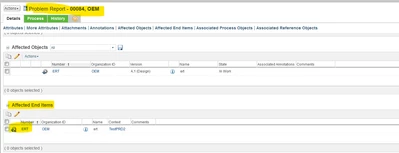
1- created data set (PR with affected end Item)

Fadel_0-1710856109481.png


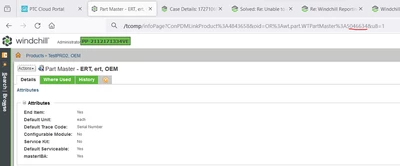
2- find the Ida2a2 of the PartMaster :

Fadel_1-1710856201049.png


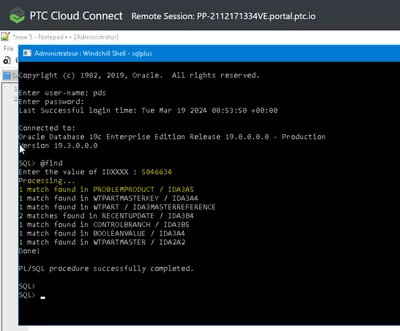
3- run Plfind script (attached the one for Oracle ) to find all references for the PartMaster ID :

Fadel_2-1710856337087.png


2 replies

Fadel
23-Emerald I
March 19, 2024

use table problem product :

Fadel_0-1710838935619.png


Fadel_1-1710838995094.png


Buiꓘa
10-Marble
March 19, 2024

Thanks, I'm trying this but not getting any results.  Please share the select tab too.  Thanks.

Fadel
23-Emerald I
March 19, 2024

better, I will share the entire report as zip ,and you can import it to your base , let me know if you need help with the import


Buiꓘa
MarcoTosin
21-Topaz I
21-Topaz I
March 19, 2024
10-Marble
March 19, 2024

Thanks but that's a different thing.  Affected end items are not the same as Affected Objects.