

Windchill Risk and Reliability - System Tree Items Configuration Table (Show P/N and Name)
Hello,
I am currently using Windchill Risk and Reliability 13.0.2.1 Enterprise Edition and would like to know, if there is any way to show the part name next to the part number in the System Tree Items selection table of the Configuration definition?
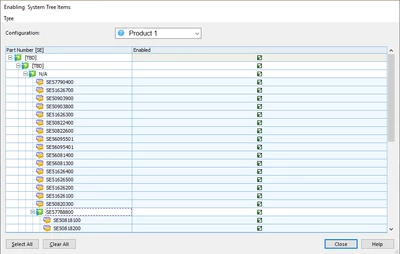
I only see the part number in this part/assembly selection table which makes it really challenging to find the correct parts/assemblies without seeing the part names.
Windchill Help only states the following (https://support.ptc.com/help/wrr/r13.0.2.0/en/#page/wrr/ReferenceGuide/basics/system_tree_item_configurations_window.html 😞
"The display field for the System Tree Items table. By default, the primary display field is Part Number, which indicates the name assigned to the assembly or part. The data in this column is display-only."
This is very misleading and wrong in my opinion. The part number does not indicate the name assigned to the part or assembly.
Probably I am missing something, but this is very annoying since the first Windchill Quality Solutions version we were using (~2013).