

1-Visitor
February 18, 2020
Solved

Windchill Save As with Creo Elements Direct Modeling Data

  • February 18, 2020
  • 1 reply
  • 1296 views

Hello,

When we are trying to use the Save-As Function in our Windchill for the Windchill Part, Model and Drawing we get an Error Message that the Object Type is invalid.
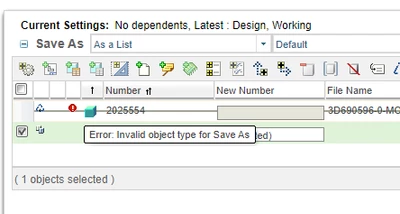
hautschi_0-1582039273201.png

I didn't find any preference which prevents the copying of CAD-Models/Drawings.

Is it possible that the Save-As Function is not working with Data from Direct Modeling?

Thank you in Advance!

Best Regards

Best answer by kfreydl

Hi

The Save-As function is not available for Creo E/D Modeling CAD documents. One reason is that Windchill cannot change the System-ID (must be unique) of the models.

Kurt

1 reply

kfreydl12-AmethystAnswer
12-Amethyst
February 20, 2020

Hi

The Save-As function is not available for Creo E/D Modeling CAD documents. One reason is that Windchill cannot change the System-ID (must be unique) of the models.

Kurt