14-Alexandrite
November 7, 2025
Question

WInDU Task for unreferenced files

  • November 7, 2025
  • 2 replies
  • 237 views

Version: Windchill 13.0


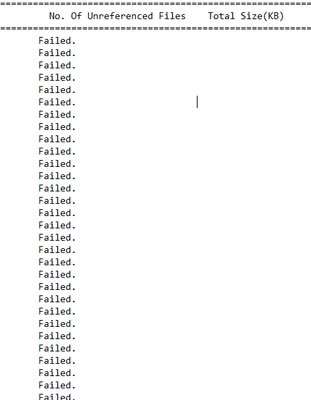
Use Case: While running the unreferenced file check from WinDU the txt file has no of unreferenced files as Failed. What does this mean ?


Description:
AP_10483126_0-1762504006243.png


2 replies

avillanueva
23-Emerald I
23-Emerald I
November 7, 2025

Does the number of failed lines correlate with anything like the number of folders you have? A good place to look deeper would be the methodserver logs at the time of run to see if it threw an error. I have never run this task before but I think it would require that vaults are healthy, validated and mounted. Clearing our unreferenced files is a periodic task that should be done to free up HD space. 

From docs:

Unreferenced Files Report
Diagnostic Task Description
This diagnostic task lists the unreferenced content files in the Windchill System and total filesize consumed by them. Unreferenced content files are the result of:
1. Failed upload
2. Deletion of Business Object from UI
Following verbose in wt.properties file should be enabled in order to generate detailed logging:
wt.fv.master.log.enabled=true wt.fv.replica.log.enabled=true
Intended Use
This diagnostic task should be executed:
• After upgrade
• When requested by PTC
Note
This diagnostic task can also be run frequently to check the Windchill system
health from disk storage perspective and hence plan for repairing the data
accordingly.


Note that removal of unreferenced files is done at the UI level but there exists a command line tool as well.

16-Pearl
November 8, 2025

Provide the complete Methodserver log generated during running the WINDu task will be helpful for understanding the report
