
6-Contributor
February 8, 2026
Question

Worker Daemon Requires Manual Restart After Windchill & Office Worker Reboot

  • February 8, 2026
  • 2 replies
  • 164 views

Hi All,

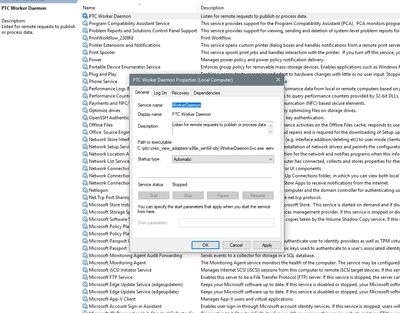
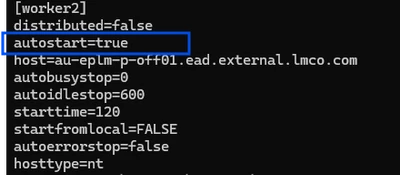
I am facing the same issue where I need to restart Worker daemon service manually, every time I re-boot windchill server and office worker server. The current situation is, We do monthly maintenance / backup and some update work. in result we need to restart Windchill services, server and publishing servers like office worker/Creo worker. We have to restart worker daemon service manually, it does not start itself. below is my current setting which shows it is set to automatic start and also /opt/ptc/Windchill_13/Windchill/conf/wvs/agent.ini file shows it autostart. but still we need to start it manually. Our office / Creo worker agent is windows server. out Windchill main server is Linux.
KS_13883962_0-1770593475958.pngKS_13883962_1-1770593509157.png


Regards,

Khalid shamim


2 replies

16-Pearl
February 9, 2026

Hi @KS_13883962,

Have you tried the workaround mentioned by @Shashwath 

https://community.ptc.com/t5/Windchill/Worker-Fails-to-Start/m-p/1001455#M84317


6-Contributor
February 9, 2026

Hi TDT,

Yes, I tried it.

1. If Windows OS go to Service> Gs Worker Deamon / PTC Worker Deamon> Properties>Recovery> First Failure - Restart services> Second Failure - Restart Services> Substantial Failure - Run Program> Program> Browse> Locate to Worker Deamon & Select> Ok. This will restart automatically without any manual processes if services fails to start. After doing these steps. Still, when I re-booted the office worker windows server.  I need to start worker daemon manually.

KS_13883962_1-1770618765538.png


KS_13883962_2-1770618806341.png


2. In Worker Agent Administrator >Step 6/7> click AutoStart CheckBox. Done

KS_13883962_0-1770618527190.png


Any other suggestion, as it wont start publishing office files unless the worker daemon is started.


Thanks


16-Pearl
February 9, 2026

I just wanted to confirm, after the worker server was rebooted, did you test any document publishing without manually starting the worker daemon?

I believe it should start automatically when a job is triggered.

What do the worker logs indicate?


14-Alexandrite
February 17, 2026

Just curious what versions of Windows and Office you are running on. We have been back and forth with PTC and Microsoft and essentially, Running the service in the background is not supported by MS. This appeared when we moved off of Server 2016 and on to anything newer like 2019 and 2022. It runs fine if you launch the worker in the foreground, but like you said in production with patching this kinda sucks. 


https://www.ptc.com/en/support/article/CS93677 

6-Contributor
February 18, 2026

Windows server 2019 standard and Office 2016. PTC recommendation is office 2019 but we were forced to revert back to office 2016 because of some publishing issue. one of the issue was the same, worker daemon was not auto starting. 


When you say "Running the service in the background is not supported by MS". can you please give some details, what Microsoft perspective is?

At the moment ,we are launching worker daemon is foreground. which is not ideal.

My next plan is to setup a  brand below windows server 2022 with office 2022. will see if it resolve the issue.

14-Alexandrite
February 18, 2026

MS is washing their hands of making changes to the Office suite to make it compatible with being ran as a service in the background. Whatever changed to make it stop working happening in Office 2019 and later. The biggest issue is with a .dll in excel. So PTC is telling us it just needs to run in the foreground and to enable autologon. 

https://www.ptc.com/en/support/article/CS93677