
17-Peridot
March 15, 2024
Question

WT Document - Name & Number will be same as WT Part

  • March 15, 2024
  • 2 replies
  • 1715 views

Hi Guys,  I need your help with this.


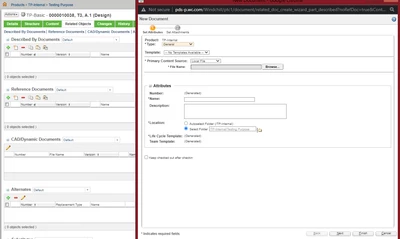
I have one WT part and I want to add local data, such as Word, TXT, and XML files. In the related object, we have a Described by Document and Reference Document. Right there, we can use that tab to create a new document and attach it. 

Here, I want the name and number that I gave in the WT part to be the same as the ones in the WT document. It's possible.


Regards,

Aj
Amirtharaj_K_0-1710497801357.png


2 replies

16-Pearl
March 15, 2024

Hi @Amirtharaj_K,


Do you want to see name and number of document same as part on loading of new WTDocument wizard?

or

its okay to have same name and number after creation of WTDocument?

17-Peridot
March 15, 2024

Thanks for the replay @TDT 

When we create a WT part i am using Name is Test and Number is 0001 when i create new document in reference document tab or described by document tab i want a same name Test and number is 0001.


Regards,

AJ

18-Opal
March 17, 2024

@Amirtharaj_K 

That’s a tricky one for number as there is no guarantee the WTPart’s number is not already used by a WTDocument.


If the Part’s number is already used by a WTDoc what logic would you use for the number of the new WTDoc?

16-Pearl
March 18, 2024

Hi Graham,

Significant Numbering and the stuff surrounding it !!

Definitely we have been through this, I am sure you too.


@Amirtharaj_K 

I request you to read about what is the drawback of Significant numbering and present it to your team for a discussion, you will be facing some bullets, but please have that discussion. 


In summary, As per the Configuration Management principles (eg: CM2 Standards), it is a trap and dangerous to have predetermined logic driven numbering to parts or documents, simply because people will start associating documents to the parts simply because their numbers are same. Lot of confusion. PLM system solves these by having the linkage (Number is no longer a link!)


Think about it.


17-Peridot
March 19, 2024

Thanks for the replay @d_graham @Hari_Vara 

I accept, but I made a mistake and will provide a different name/number. For example, I am only sharing those documents for particular departments, except for others. How can I find it? I need the name or number that is the same as the WT part.

Number - I can provide autonumbering, but at least I want the same name as the WT part name.

Because I am not creating an individual WT document and adding it to the WT Part Right. I directly create a WT document in the WT part. Even though we create it directly in the WT part, the document is saved separately. It's only a link to each other, right?


Regards,

Aj