

CHENAMA
14-Alexandrite
July 31, 2023
Solved

WT-Part Structure Visualization see which Reference Designator is assigned to which Occurence in 3D

  • July 31, 2023
  • 1 reply
  • 1040 views

I am using Windchill PDMLink Release 11.1 and Datecode with CPS M020-CPS23

How to see in WT-Part Structure Visualization which Reference Designator is assigned to which Occurence in 3D?
When selecting a Part in visualization, I can't find any information which Reference Designator is assigned to it. Also when selecting any Occurence in the Occurence list, no object is being selected in the Visualization tab.
Best answer by HelesicPetr

Hi @CHENAMA 

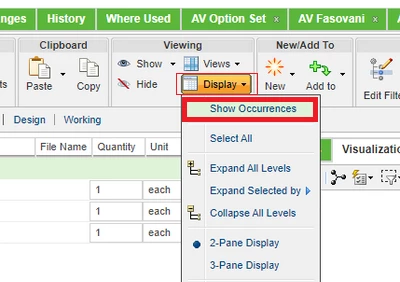
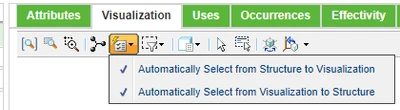
Try to use Show occurances and then try to use select visualization. It should help you.

HelesicPetr_2-1690798390213.png

HelesicPetr_1-1690798345045.png


PetrH


1 reply

HelesicPetr
22-Sapphire II
22-Sapphire II
July 31, 2023

Hi @CHENAMA 

Try to use Show occurances and then try to use select visualization. It should help you.

HelesicPetr_2-1690798390213.png

HelesicPetr_1-1690798345045.png


PetrH


CHENAMA
CHENAMA14-AlexandriteAuthor
14-Alexandrite
July 31, 2023

Wow thank you @HelesicPetr, that was almost too easy 🙂