
13-Aquamarine
September 4, 2026
Solved

Add button on Folder Contents

  • September 4, 2026
  • 3 replies
  • 91 views

Hello everyone, I'm using Windchill 13.1.4.0 Rev 01 (a virtual machine downloaded from the PTC website). I'd like to create a button (with an icon) to insert into the Windchill Contents folder so that clicking the button modifies an attribute of the selected row. The figure below shows the panel where I'd like to insert the button. 
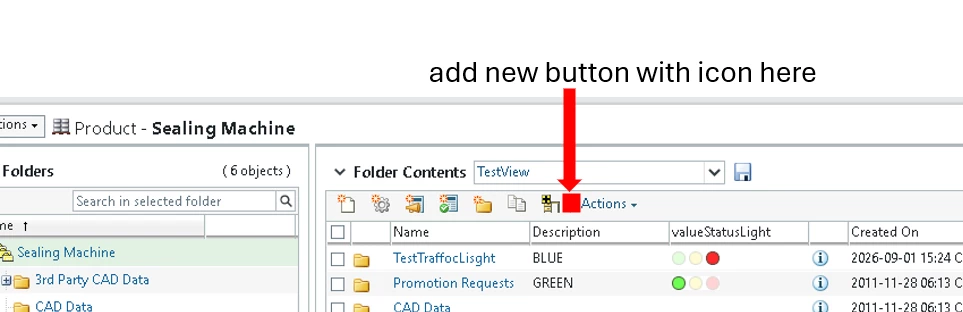
I tried adding an action in custom-actions.xml and custom-actionModels.xml, but nothing appears. Any suggestions?

BR

Dimitri
Best answer by dbologna

I found the solution: in the custom-actions.xml file, I added…

<objecttype name="custom" carlType="custom">
      <action name="changeStatusLightAction" selectRequired="true" multiselect="false">
         <command class="com.ptc.core.ui.resources.NullCommand" method="execute" url="netmarkets/jsp/custom/changeStatusLightWizard.jsp" windowType="popup"/>
         <icon>netmarkets/images/custom_icons/changeStatus_14.png</icon>
         <label>Cambia ValueStatus(JSP)</label>
         <tooltip>Cambia ValueStatus(JSP)</tooltip>
         <includeFilter name="all"/>
      </action>
   </objecttype>
while in the custom-actionModels.xml file, I added…

<model name="folderbrowser_toolbar_actions" incremental="">
      <action name="changeStatusLightAction" type="custom" shortcut="true" insertAfterActionName="WFADDTOWORKSPACE" insertAfterObjectType="folder"/>

</model>

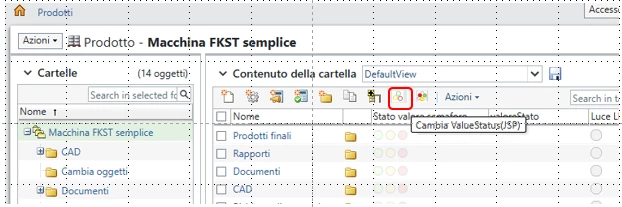
Below is an image of the added button.

BR
Dimitri​​​​​​​


3 replies

18-Opal
September 4, 2026

Hi ​@dbologna,

Is your custom action displaying in the Actions drop-down?
If not, you may need to check your custom-actions.xml and custom-actionModels.xml configurations.
For a shortcut button to be displayed for an action, include the shortcut="true" parameter in the action model file.
<action name="create" type="document" shortcut="true" />

17-Peridot
September 18, 2026

​@dbologna - perhaps the code you added in your custom-actions.xml and custom-actionModels.xml would help. I think you need some items from the “FolderManagement-actions.xml”. 

CS441960 might help. 


dbologna13-AquamarineAuthorAnswer
13-Aquamarine
September 18, 2026

I found the solution: in the custom-actions.xml file, I added…

<objecttype name="custom" carlType="custom">
      <action name="changeStatusLightAction" selectRequired="true" multiselect="false">
         <command class="com.ptc.core.ui.resources.NullCommand" method="execute" url="netmarkets/jsp/custom/changeStatusLightWizard.jsp" windowType="popup"/>
         <icon>netmarkets/images/custom_icons/changeStatus_14.png</icon>
         <label>Cambia ValueStatus(JSP)</label>
         <tooltip>Cambia ValueStatus(JSP)</tooltip>
         <includeFilter name="all"/>
      </action>
   </objecttype>
while in the custom-actionModels.xml file, I added…

<model name="folderbrowser_toolbar_actions" incremental="">
      <action name="changeStatusLightAction" type="custom" shortcut="true" insertAfterActionName="WFADDTOWORKSPACE" insertAfterObjectType="folder"/>

</model>

Below is an image of the added button.

BR
Dimitri​​​​​​​