
16-Pearl
February 22, 2018
Question

Add the CR title to the notification email.

  • February 22, 2018
  • 2 replies
  • 2225 views

A common complaint from our users is that they cannot tell what the task is related to when they are sent an Approval task email or an overdue email.
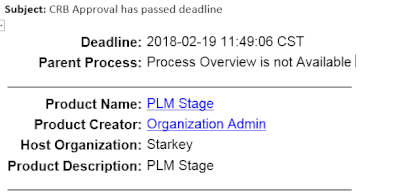
2-22-2018 10-16-29 AM.gif

Anyone know how to add the title of the CR in these notifications?


2 replies

1-Visitor
February 22, 2018
1-Visitor
April 18, 2018

 Hello,


I created a workflow variable named "ecrDescription." This is a String variable. At the beginning of the workflow I created an expression robot that contains the following code:

ecrDescription = ((wt.change2.WTChangeRequest2) primaryBusinessObject).getDescription();

You can just as easily use methods like

getName()

or

getNumber()

Next, you can add this information to your email notification robot by entering the workflow variable name surrounded by curly braces like this:

ecrResolved.PNG


In my example this is only shown in the body of the email but it should also work in the subject line. The only downside to this is that you really should use an expression robot before every email notification robot to update your variables. For example, the ECR Description might change between the creation and resolution dates and you don't want to send the outdated information with your email notifications.

21-Topaz I
April 19, 2018

This should be something available out of the box in Windchill!

1-Visitor
October 10, 2019

@STEVEG 
It is astonishing to me, that it is not a standard feature.  Everywhere I've gone folks add this to their tasks.  Oh well, just not a priority for PTC. 

James