
14-Alexandrite
August 28, 2026
Solved

Adding Custom Attribute Column to OOTB Affected Objects Table

  • August 28, 2026
  • 1 reply
  • 61 views

Use Case -  I need to add a Custom Attribute named as “Latest Revision” as a column beside the ootb “Version” column on a affected objects table. This is needed especially for Problem Report, Change Notice and Change Requests Affected Objects table while Initialization i.e creation of these change objects 

Like in below picture, I need to add another column beside Version to show wether the Row Object is Latest revision or no, Values should be “Yes” or “No”
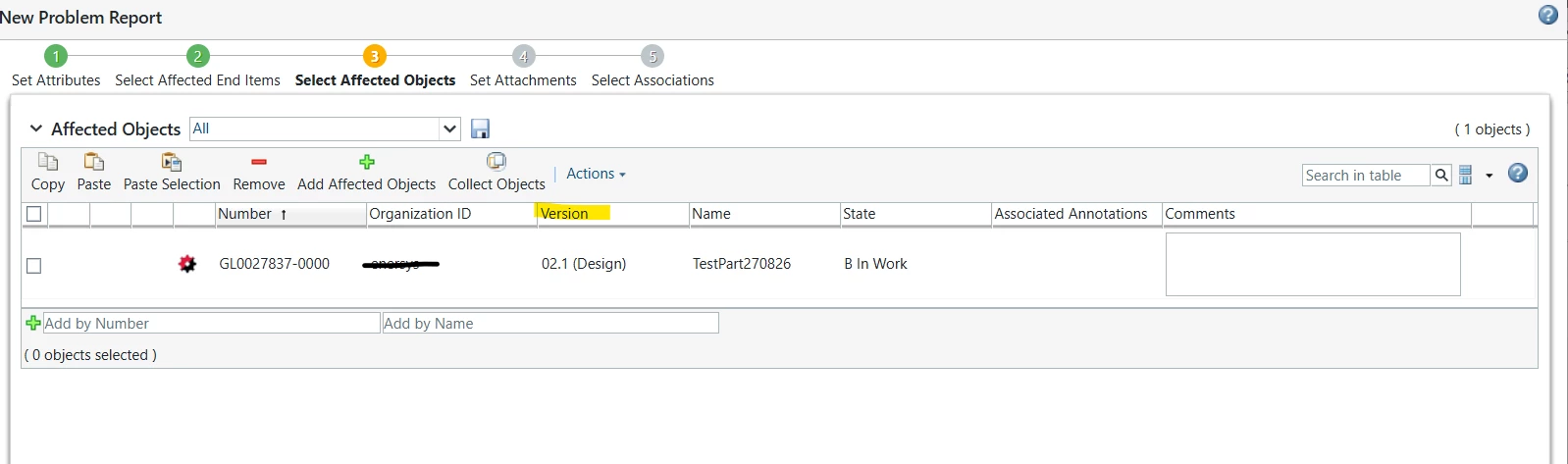
Need to design solution approach for this

Best answer by TDT

You can implement this in two ways,

  1. Extend the OOTB AffectedDataTableBuilder in your custom table builder. Add a new column and use a Data Utility to check whether the object is the latest revision and return the appropriate value.
  2. Since the OOTB table view is already available, you can create a custom attribute to store the latest revision information. Update this attribute whenever a new version is created. You can then include this attribute in the table view as required.

1 reply

TDT18-OpalAnswer
18-Opal
August 30, 2026

You can implement this in two ways,

  1. Extend the OOTB AffectedDataTableBuilder in your custom table builder. Add a new column and use a Data Utility to check whether the object is the latest revision and return the appropriate value.
  2. Since the OOTB table view is already available, you can create a custom attribute to store the latest revision information. Update this attribute whenever a new version is created. You can then include this attribute in the table view as required.