
15-Moonstone
November 19, 2023
Question

Assigning a task to more than one person

  • November 19, 2023
  • 2 replies
  • 2463 views


Hi community!


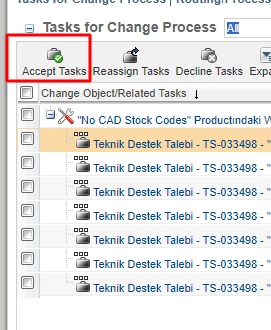
I can send a task to more than one person, as in the image below.
But I need to make a distribution within the group to determine who will perform these tasks.
For this reason, how can I assign a task to more than one person with the 'accept task' button?


smcvr_0-1700395506448.png


2 replies

jbailey
18-Opal
November 19, 2023

The functionality of "Accept Task" is that when it is assigned to multiple people- When someone accepts, it disappears from everyone else. A couple of simple options are to have the task assigned to the "Manager" who will decide who will do the task and reassign accordingly, or to add a Set Participant Task to the workflow and assign that task to the person deciding who should do the work.

HelesicPetr
22-Sapphire II
22-Sapphire II
November 20, 2023

Hi @smcvr 

In the workflow task definition you can set how many users have to finish the task. 

So you can configure it. If one person accept the task it still be available for others that can finish it or accept it

HelesicPetr_1-1700468494731.png


PetrH


smcvr15-MoonstoneAuthor
15-Moonstone
November 20, 2023

Hi @HelesicPetr 

I do not want to put a limit on this value.

For example, the task went to 10 people, sometimes I have to assign it to 3 people and sometimes to 5 people. When I set the limit to 5, all 5 people have to approve. In this case, when I assign it to 3 people, 2 more people need to close the task.

Can't I do this situation without limits?

jbailey
18-Opal
November 20, 2023

You can do a tally expression and say that everyone must complete