
10-Marble
October 16, 2024
Solved

Automatically fill in Name when creating a new review

  • October 16, 2024
  • 2 replies
  • 837 views

Version: Windchill 12.0


Use Case: Automatically fill in Name when creating a new review


Description:

I now need to generate a name automatically based on the selected WTPart when creating a new review. The name generation rule is  WTPart.getname + "_" + WTPart.getNumber()
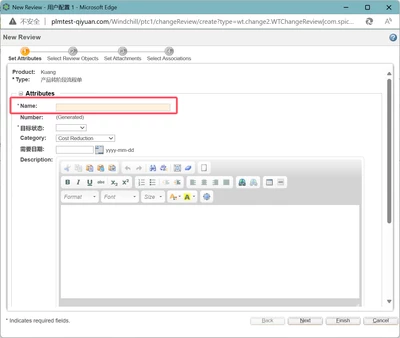


ZK_11667139_0-1729073594729.png


Best answer by ZK_11667139

I have solved this problem by setting the DataUtility in the layout by assigning the Name property. thank you.

2 replies

Catalina
Community Moderator
October 18, 2024

Hi @ZK_11667139 

Thank you for your question!

Your post appears well documented but has not yet received any response. I am replying to raise awareness. Hopefully, another community member will be able to help.

Also, feel free to add any additional information you think might be relevant.


Best regards,

Catalina | PTC Community Moderator
18-Opal
October 21, 2024

@ZK_11667139 ,


I figured out how to do this.

See images below.

From the WTPart's info page we can see the name and number.

d_graham_0-1729513004091.png

I then select New > New Review from the actions menu.

d_graham_1-1729513141884.png


Per your spec, the <name> - <number> of the WTPart automatically populate the Name field in the UI.

d_graham_2-1729513263761.png


It is doable, but I had to hack the data utility that populates that field as that data utility is not exposed to the user, meaning it cannot be overridden as is done with many data utilities.  At least I did not find a way to override it.

And to be honest, hacking the OOTB code can be simpler in the long run as there's no need to edit any properties.


So, definitely doable and easily portable to the next version of Windchill when you upgrade.


David

ZK_1166713910-MarbleAuthorAnswer
10-Marble
October 22, 2024

I have solved this problem by setting the DataUtility in the layout by assigning the Name property. thank you.