
12-Amethyst
December 3, 2024
Question

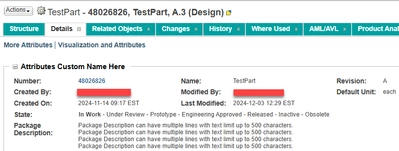
Can the attribute title be displayed in single line, without wrapping to next line?
  • December 3, 2024
  • 2 replies
  • 687 views

RG_11025060_0-1733250298031.png

This is view More Attributes Info Page Layout on a WTPart.
Can the attribute title be displayed in single line? without wrapping to next line.
"Package Description" as two continuous words?


2 replies

HelesicPetr
22-Sapphire II
22-Sapphire II
December 4, 2024

Hi @11025060 

You can modify css style to set no-wrap css configuration.

Just go to the Windchill folder and modify the css file xtheme-windchill.css

...Windchill\codebase\netmarkets\themes\windchill\xtheme-windchill.css

search for .attributePanel-label

add a row to this cofiguration text-wrap: nowrap !important;

save and that's all

HelesicPetr_0-1733298570023.png

.attributePanel-label, .pplabel {
 font-size: 12px;
 font-weight: bold;
 text-wrap: nowrap !important;
}


Check the Document Subcategory attribute

Originally rendered

HelesicPetr_2-1733298741691.png

Result>

HelesicPetr_1-1733298703951.png


17-Peridot
December 4, 2024

Just an addition, I wouldn't change the original file, rather add a custom CSS file which then overrides this property.

See: https://support.ptc.com/help/windchill/r13.0.2.0/en/index.html#page/Windchill_Help_Center/customization/WCCG_UICust_UITechOview_AddCustomCode_JavascriptCSSFiles.html%23wwID0E5D2O

HelesicPetr
22-Sapphire II
22-Sapphire II
December 4, 2024

Agree @BjoernRueegg 

This is the best practice. 

PetrH

Community Moderator
December 18, 2024

Hi @11025060,


I wanted to see if you got the help you needed.

If so, please mark the appropriate reply as the Accepted Solution. It will help other members who may have the same question.
Please note that industry experts also review the replies and may eventually accept one of them as solution on your behalf.
Of course, if you have more to share on your issue, please pursue the conversation. 


Thanks,
Anurag