

CATIA CAA RADE setup - No Visual Studio checkbox in Environment Setup / Can Someone who can access..
I have been tasked with installing CATIA CAA RADE V5-6R2016 SP3 on a client's machine. I've installed VS (Visual Studio) 2008 SP1 and VS 2012 Update 4 with hotfixes, as suggested in Dassault Systemes' (publisher of CATIA) program directory:
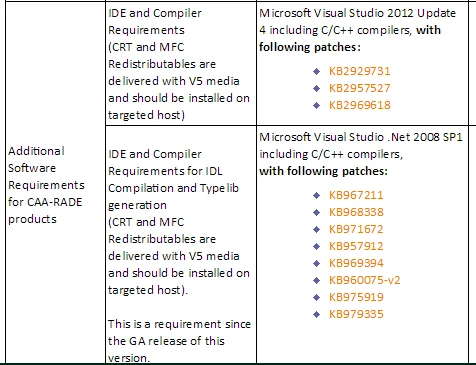
But, I am unable to integrate RADE into Visual Studio. Could it have anything to do with the parenthetical statements in the second column: "CRT and MFC Redistributables are delivered with V5 media..."? What are CRT and MFC distributables? I couldn't find anything on Google.
I come to your aid because I found a post in PTC Technical support categorized under Windchill that matches my current dilemma almost exactly:
https://support.ptc.com/apps/solution_preview/solution/lang/presolution?lang=en&n=CS233381
Could anyone who can access PTC Technical Support/eSupport tell me what PTC support's answer was to solve the issue?
Thank you.