12-Amethyst
December 11, 2019
Question

Changing Routing Option Text

  • December 11, 2019
  • 2 replies
  • 3033 views

Hello,


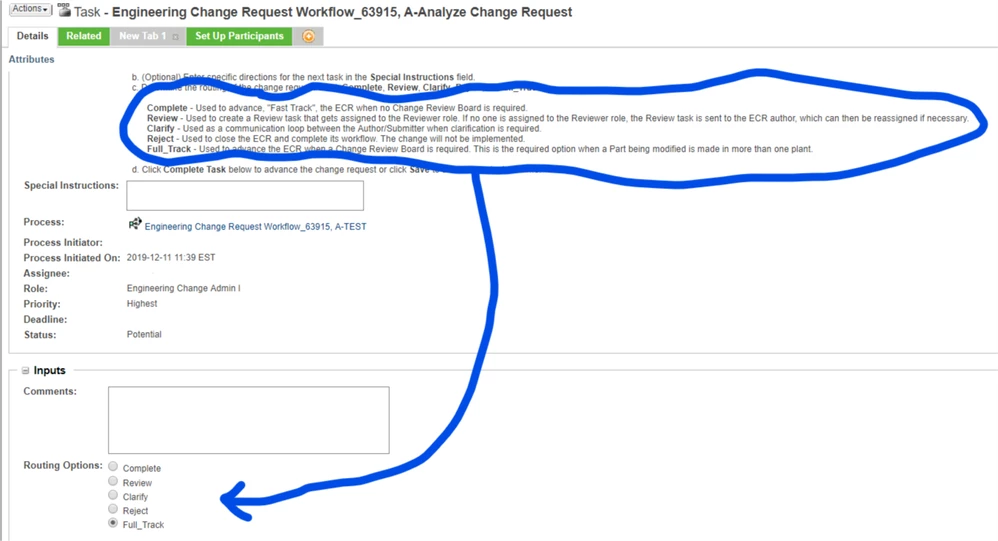
I would like to modify the text of the Routing Options radio buttons to give the user more information about what each option actually does. I have put the information above in the "instructions" area (as seen below), but typically people don't read it. ðŸ˜€


jmomber_1-1576083665348.png


In my lovely mock up, I would like the Routing options to look like this:
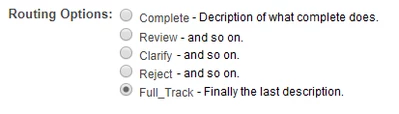
 

jmomber_2-1576084030774.png


I understand the the text is driven from the workflow Routing tab and I don't think it can be changed, but thought maybe some savy person has a solution.


Thanks!

2 replies

5-Regular Member
December 11, 2019

Jmomber,


I've only seen the instruction area customized before, and not the radio button text specifically, but maybe try logging a Support case with PTC support, as one of the Windchill customization engineers can confirm if that's possible or not?

jmomber12-AmethystAuthor
12-Amethyst
December 11, 2019

Thanks! I do have a ticket open but figured I'd ask here as well. It SHOULD be an easy yes or no ticket, but will probably take a week of back and forth explaining what I want and why.

5-Regular Member
December 11, 2019

Hi jmomber,


I do see you since logged a case, so one of the customization engineers should be able to answer.

FYI, I would make sure you include all the info/screenshot from here, into your case, as the info in this forum posting is clear (when you include the screenshot).


Cheers,

22-Sapphire I
December 11, 2019

Can simply edit the text in the workflow routing tab choices. Just make sure that the choices are exactly updated to match in the code section of the same tab on the right.


At times, text with spaces needs to be enclosed in quotes - check syntax in that UI.


Note also though that Full-Track and Fast_Track are different. There is code that transfers this choice from CR to CN and affects the CN path.  Try other others first.

jmomber12-AmethystAuthor
12-Amethyst
December 11, 2019

I honestly didn't try that because I didn't think it would work for text that is more than a single word or words with things like _ to replaces the spaces, but I know that's how you traditionally do it. The text for a couple of them is quite long. I'll try it Monday or later tonight if I'm bored. Thanks!