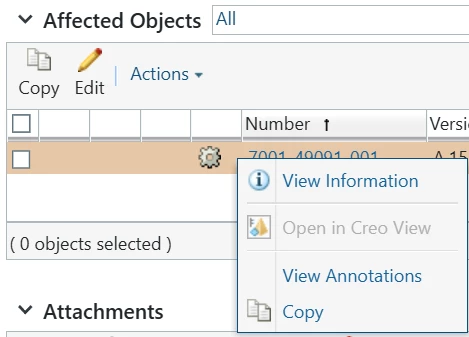
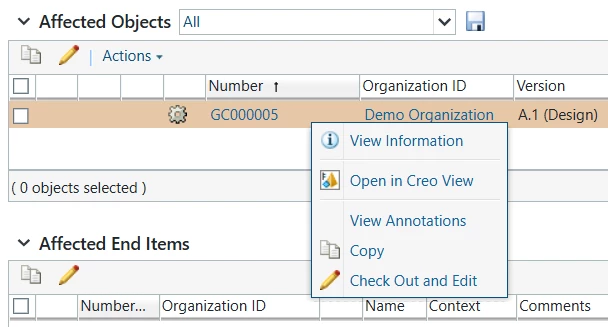
Is it possible to add a `Check out and Edit` option either a right-mouse button click or in the Actions pull down within the Affected objects table of a problem report? I didn’t see any options in the task form template…
The "Checkout and Edit" functionality cannot be implemented through a simple configuration because the affected objects table contains different object types.
If the object type is exclusively Part, it would be possible to add the following configuration:
<action name="checkoutAndEdit" type="part"/>
Steps: 1. Edit <wt_home>/codebase/config/action/ChangeManagement-actionModels.xml 2. Copy all contents of <model name="issues.affectedData.row.actions.view"> <model name="issues.affectedData.row.actions.view"> <description>Row actions for the affected objects table for the issues info pages</description> …… <action name="openProductView" type="wvs"/> <action name="separator" type="separator"/> <action name="viewAnnotationsForChgLnk" type="annotation"/> <action name="copy" type="object"/> </model> 3. Paste the contents to <wt_home>/codebase/config/action/custom-actionModels.xml
4. Add <action name="checkoutAndEdit" type="part"/> to <model name="issues.affectedData.row.actions.view"> in <wt_home>/codebase/config/action/custom-actionModels.xml <model name="issues.affectedData.row.actions.view"> <description>Row actions for the affected objects table for the issues info pages</description> …… <action name="openProductView" type="wvs"/> <action name="separator" type="separator"/> <action name="viewAnnotationsForChgLnk" type="annotation"/> <action name="copy" type="object"/> <action name="checkoutAndEdit" type="part"/> </model> 5. Restart Windchill
What is the business need for updating objects from a Problem Report? I would generally prefer that only released objects be associated with a Problem Report. Do you have a process in place that allows Problem Reports to be created for objects that are still in the In Work state?
I have a subtype of Problem Report type for a particular application that gets sent to a team to verify certain attributes are set correctly. It’s an inexpensive choice because that object type can be triggered by a “collaborate” license and not only Standard Author.
If I have several WTParts in the PR subtype, the team has to go through each one manually to the information page to make the edits. It’d be nice to be able to include a right-click edit option.
The "Checkout and Edit" functionality cannot be implemented through a simple configuration because the affected objects table contains different object types.
If the object type is exclusively Part, it would be possible to add the following configuration:
<action name="checkoutAndEdit" type="part"/>
Steps: 1. Edit <wt_home>/codebase/config/action/ChangeManagement-actionModels.xml 2. Copy all contents of <model name="issues.affectedData.row.actions.view"> <model name="issues.affectedData.row.actions.view"> <description>Row actions for the affected objects table for the issues info pages</description> …… <action name="openProductView" type="wvs"/> <action name="separator" type="separator"/> <action name="viewAnnotationsForChgLnk" type="annotation"/> <action name="copy" type="object"/> </model> 3. Paste the contents to <wt_home>/codebase/config/action/custom-actionModels.xml
4. Add <action name="checkoutAndEdit" type="part"/> to <model name="issues.affectedData.row.actions.view"> in <wt_home>/codebase/config/action/custom-actionModels.xml <model name="issues.affectedData.row.actions.view"> <description>Row actions for the affected objects table for the issues info pages</description> …… <action name="openProductView" type="wvs"/> <action name="separator" type="separator"/> <action name="viewAnnotationsForChgLnk" type="annotation"/> <action name="copy" type="object"/> <action name="checkoutAndEdit" type="part"/> </model> 5. Restart Windchill