

Creo Web View does not work
Hi there,
I installed Windchill 13.0.2.13 and migrated my data from the current WC 12.0.
Creo View Web 13.0.0.0 -S51FJ4 is installed, but I cannot get this started.
Versions:
- Release: 13.0.2.13
Products Installed - Creo View - Desktop 13.0.0.0-S4R7L1
- windchill 13.0.2.13 REST services
- Creo View - Adapters 13.0.0.0-S4QN3N
- windchill 13.0.2.13 service pack
- windchill pdmlink 13.0.2.0
- windchill 13.0.2.0 multi-language pack
- windchill 13.0.2.0 info*engine
- Creo View - Web 13.0.0.0-S51FJ4
- windchill 13.0.2.0 Services
- windchill 13.0.2.0 common base
I added a configuration under Site→ Utilities → Visualization Configuration Administration (as described in https://support.ptc.com/help/windchill/r13.1.2.0/en/index.html#page/Windchill_Help_Center/WVSCreoViewIntegration/WVSDownloadingAndInstallingCreoViewWeb.html ).
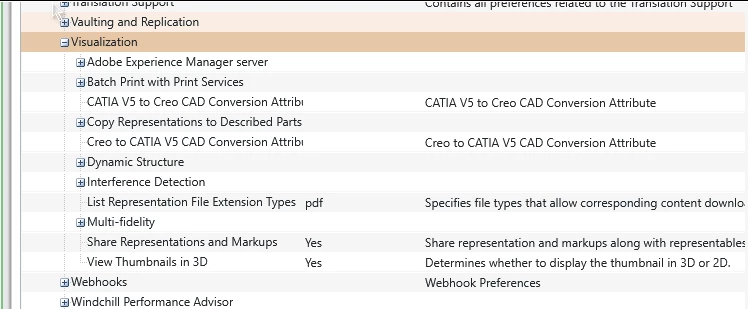
But there is no option to open a model in Creo View Web and the options “Preferred Viewer Platform” and “ Prompt for Viewer Platform Selection on Launch” are also missing in Site→ Utilities → Preference Management → Visualization
I already tried reinsalling Creo View Web, but no luck (ran CPS Update again and checked Creo View Web for installation).
Any ideas, please?