

avillanueva
23-Emerald I
23-Emerald I
April 21, 2023
Question

Disappearing column on print preview

  • April 21, 2023
  • 1 reply
  • 873 views

I've struggle with this for some time and now I want to see about fixing it. I know that PDMLink tables do not print well. You are limited to the view window and output is highly dependent on the adjustments the user can make. This is a strange one that was reported to me. Here is the screen view of this BOM table, derived from the multilevel BOM report:
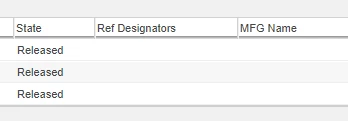
avillanueva_0-1682093593268.png

Here is how that looks in print preview if I try to PDF the page:
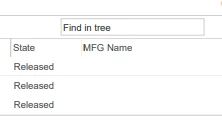
avillanueva_1-1682093640550.png

It erased the Ref Designator column. WYSINWYG for sure. 

Anyone know what is going on here? Since this is a custom table I can edit column properties if need be. 


1 reply

joe_morton
18-Opal
18-Opal
April 24, 2023

How are you printing it? Is this a custom table?


The only thing that comes to mind is that Ref Designators is a part usage attribute, not a direct part attribute. So it's a different type of column than the others. Do you have a quantity column that prints successfully?


Still, very strange. 

avillanueva
23-Emerald I
23-Emerald I
April 24, 2023

Just normal Control-P to PDF typically. I am looking into how the column definition is done and what might be different with this column. Yes, this is a custom table extended from the Multi-level BOM report with replacements. I have a custom Tree Builder. The only major difference I noted is that I did not specify setExactWidth(true) for this column like I did others however this column can get very large with a big reference designator string.

//ref designator
 else if (colConfig.getId().equals("refDesignators"))
 {
 colConfig.setLabel("Ref Designators"); //12-4-2019: reducing to single line header
 colConfig.setColumnWrapped(true);
 colConfig.setWidth(200);
 colConfig.setDataUtilityId("wrapString");
 colConfig.setSortable(false);
 }