10-Marble
August 31, 2022
Solved

Display alert dialog on user interface from custom java validation

  • August 31, 2022
  • 2 replies
  • 3894 views

Hello everyone!

I've made a custom validation class on Promotion Request Wizard to allow only 1 Object to be promoted.

On my implementation of DefaultUIComponentValidator, the method performFullPreValidation(UIValidationKey arg0, UIValidationCriteria arg1, Locale arg2) throws a WTException when validation not met the requirements, but the message on Exception do not show to the final user, just appear on console.

What's happening? Am I missing something? What's the correct way to display exception message to the final user through alert dialog?


This is the implementation:


public UIValidationResultSet performFullPreValidation(UIValidationKey arg0, UIValidationCriteria arg1, Locale arg2) throws WTException {
	if(arg1.getTargetObjects().size() == 1) {
		return super.performFullPreValidation(arg0, arg1, arg2);
	} else if(arg1.getTargetObjects().size() > 1) {
		throw new WTException("Only one object allowed for promotion");
	} else {
		throw new WTException("Need to select one object for promotion");
	}
		
}



Best answer by HelesicPetr


Hello @JD_8489700 ,


I try some ways how to achieve what you need but I don't think that it is possible by that Validator. May be I am not right.


I found the solution but is is not recommended because .I change js script directly in the OOTB js file.

That means every update/upgrade you have to change that js file. (i guess that there could be better implementation 😄 )


But I couldn't find better way now how to disallow promotes just one object even there are more. (I could not find the promotable objects in a NmCommandBean there is just selection... )


you have to modify JS script with following code

the file is in <WTHOME>\codebase\netmarkets\javascript\promotionRequest\promotionRequest.js


find a row with function validatePromotionTable: function(wizardAction) {,,,,,


in the end is a row with the code 


return PTC.promotion.validateForDuplicates(allOids, promotedOids);


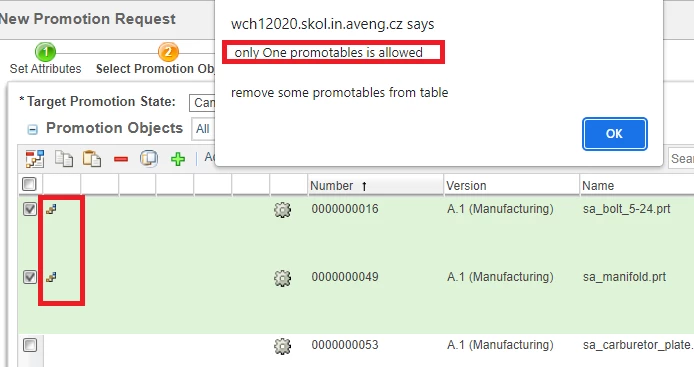
before this row put following code that controls how many promotables are set to promote


 if (promotedOids.length !== 1 ) {
 JCAAlert(
 "",
 "only One promotables is allowed"
 + "\n\n"
 + "remove some promotables from table");
 return false;
 }


save the file, and restart Windchill. 

clear a explorer cache or use CTRL+5 to load new js script. 

{in some cases the restart is not needed. }


HelesicPetr_0-1662399408498.png


PetrH

2 replies

avillanueva
23-Emerald I
23-Emerald I
August 31, 2022

throwing an exception is not the right way. You need to return a UIValidationResult with a UIValidationStatus.DENIED.  Page 426 of the customizer's guide has an example.  There you can provide a message back to the user.

10-Marble
September 1, 2022

Hello @avillanueva!

The example on page 426 is marked as deprecated and need to change the return type to UIValidationResult, but the return type is UIValidationResultSet.

I'm going to try to use some UIValidationResultSet implementations...

HelesicPetr
22-Sapphire II
22-Sapphire II
September 1, 2022

Hi @JD_8489700 

Try to use something like this>


		if(arg1.getTargetObjects().size() == 1) {
			return super.performFullPreValidation(arg0, arg1, arg2);
		} else if(arg1.getTargetObjects().size() > 1) {

			UIValidationResultSet validResultSet = UIValidationResultSet.newInstance();
			UIValidationResult result = UIValidationResult.newInstance();
			result.setTargetObject(arg1.getContextObject());
			result.setStatus(UIValidationStatus.DENIED); // or NOT_VALIDATED
			
			List<UIValidationFeedbackMsg> msgList = new ArrayList();
			msgList.add(UIValidationFeedbackMsg.newInstance("Only one object allowed for promotion", FeedbackType.FAILURE));

			result.setFeedbackMsgList(msgList);
			validResultSet.addResult(result);
			return validResultSet;

		} else {
			
			UIValidationResultSet validResultSet = UIValidationResultSet.newInstance();
			UIValidationResult result = UIValidationResult.newInstance();
			result.setTargetObject(arg1.getContextObject());
			result.setStatus(UIValidationStatus.DENIED); // or NOT_VALIDATED

			List<UIValidationFeedbackMsg> msgList = new ArrayList();
			msgList.add(UIValidationFeedbackMsg.newInstance("Need to select one object for promotion", FeedbackType.FAILURE));

			result.setFeedbackMsgList(msgList);
			validResultSet.addResult(result);
			return validResultSet;
		}


Hope this can help


PetrH


10-Marble
September 1, 2022

Hi @HelesicPetr, this method did not returned the message to the user and passed validation as valid.

Is something missing in other configuration?

HelesicPetr
22-Sapphire II
22-Sapphire II
September 1, 2022

Hi @JD_8489700 

I guess that there could be better status for result


result.setStatus(UIValidationStatus.DENIED); // or NOT_VALIDATED


DENIED do not work try another one.  Check UIValidationStatus.class to get all options and try them. 


where is  a performFullPreValidation() called? from some Validator class defined in a modelAction.xml or by clicking finish so in Processor? or another way? 


If you call own ...Processor and use preOperation method to check the results the return is FormResult and the message to a user needs to be set in the FormResult.


The performFullPreValidation do not return the FormResult thus you need to read the error message from the UIValidationResultSet and forward it to a FormResult object.


FormResult uses a FeedbackMessage object. Exampe:


ArrayList<String> incorectMessage = new ArrayList<>();
WTMessage msg = new WTMessage("cz.aveng.Publish.PublishMessageResource", "TASK_DELETE_WARNING_PERMISION_TITLE", (Object[]) null);
feedBack = new FeedbackMessage(FeedbackType.FAILURE, locale, msg.getLocalizedMessage(locale), incorectMessage, "Only CAD Documents are allowed to add. Remove selection of non CAD Documents");


PetrH