
12-Amethyst
August 24, 2022
Solved

Do not close dropdown

  • August 24, 2022
  • 1 reply
  • 1544 views

Hello,


I have a question regarding Windchill dropdowns. So by default, when clicking an action in a dropdown the dropdown closes automatically like the one shown in the image.
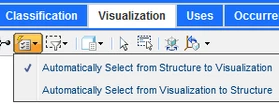
FS_10272716_0-1661331921780.png

What I need is a way to keep it opened so the user can click multiple entries without having to open the dropdown several times.


The customize button you can find on the Windchill homepage does exacly that. The dropdown does not close after clicking an entry. This way you can easily select multiple checkboxes at a time.
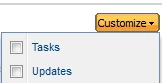
FS_10272716_1-1661332010928.png


Is there a way to prevent the dropdown model from closing or is this Windchill specific and can not be customized.


Best regards

Best answer by HelesicPetr

Hi @TG_10272716 

I've caught the point. 


There is huge limitation to customize the Structure menu because it is GoogleToolkitWeb(GWT) application and code is little bit hardcoded. 


I can help you to add a button or function there  but change the behavior in GWT is over my knowledge. 


PetrH

1 reply

HelesicPetr
22-Sapphire II
22-Sapphire II
August 24, 2022

Hi @TG_10272716 


The general information would be what Dropdown menu are you talking about?

Where do you need to put that dropdown menu?

Example some picture would be nice to see what is your idea to achieve.


Generally ComboBox can be set to use multiple selection that you can select more options in a the dropdown list.


So try to specify more details of your needs.


PetrH

12-Amethyst
August 24, 2022

Hi,


it is just a general question so there is no dropdown menu where I plan to apply this yet.

But here is an example, I hope you can see the image:

FS_10272716_1-1661343806122.png

Under Article Structure -> Visualization there is a "Show" dropdown like you can see in the image.

When I click on any entry e.g Documents the dropdown closes but I want it to stay opened so I can then check or uncheck further elements.


Me 2nd example was about the "Customize" button you can find in the top right corner of the Windchill homepage.

Image:

FS_10272716_2-1661343971383.png

When I click something here so e.g select Tasks then this model or however you would like to call it stays opened and does not close like the aforementioned "Show" dropdown.


My question is if this behaviour is customizable so that you can specify whether those action models close when selection an action or not.

They also close when clicking somewhere else on the page, which is fine but just to give you an example.


Best regards

HelesicPetr
22-Sapphire II
22-Sapphire II
August 24, 2022

Hi @TG_10272716 

I've caught the point. 


There is huge limitation to customize the Structure menu because it is GoogleToolkitWeb(GWT) application and code is little bit hardcoded. 


I can help you to add a button or function there  but change the behavior in GWT is over my knowledge. 


PetrH