

Email Subject Line Customization
Version: Windchill 12.0
Use Case: Need to append string at the start of the subject line.
Description:
I have been trying to add string at the start of the subject line and it is working for General.html and NotificationRobot.html templates.
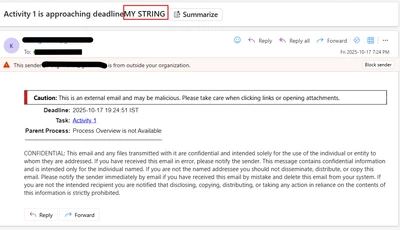
ex: my email subject look like this: Custom String + Analyze Problem Report
Now trying the same for templates ApproachingDeadlineNotification.html, CompleteNotification.html, OverdueNotification.html and it is not working.
String always attached at the end of subject line no matter what.
In screenshot attached see "MY STRING" is at the end of subject line.
<html>
<body>
<table border="0" cellpadding="3" cellspacing="0">
<SCRIPT LANGUAGE=Windchill>
getPJLNotificationTitleRow
</SCRIPT>
<tr>
<td align="right" valign="top" nowrap>
<font face="Arial, Helvetica, sans-serif">
<b>
<SCRIPT LANGUAGE=Windchill>
<!-- getDeadLineLabel resourceKey=DEADLINE_COLON resourceClass=wt.workflow.engine.engineResource -->
</SCRIPT>
</b>
</font>
</td>
<td align="left" valign="top">
<font face="Arial, Helvetica, sans-serif">
<SCRIPT LANGUAGE=Windchill>
getDeadline
</SCRIPT>
</font>
</td>
</tr>
<SCRIPT LANGUAGE=Windchill>
getOverdueTaskRow
</SCRIPT>
<SCRIPT LANGUAGE=Windchill>
getParentProcessRow
</SCRIPT>
<tr>
<td colspan="2">
<hr size="1" color="#40637A">
</td>
</tr>
<tr>
<td align="right" valign="top" nowrap>
<font face="Arial, Helvetica, sans-serif">
<SCRIPT LANGUAGE=Windchill>
getProcessVariable varName="Container_Name"
</SCRIPT>
</font>
</td>
</tr>
<tr>
<td>
<SCRIPT LANGUAGE=Windchill>
<!-- beginSubject -->
</SCRIPT>
<SCRIPT LANGUAGE=Windchill>
<!-- addText text=" " -->
</SCRIPT>
<SCRIPT LANGUAGE=Windchill>
<!-- addText text="MY STRING" -->
</SCRIPT>
<SCRIPT LANGUAGE=Windchill>
<!-- addText text=" " -->
</SCRIPT>
<SCRIPT LANGUAGE=Windchill>
<!-- endSubject -->
</SCRIPT>
</td>
</tr>
</table>
</body>
</html>