17-Peridot
November 19, 2019
Solved

How can I change the columns from a table named "Promotion Object"?

  • November 19, 2019
  • 1 reply
  • 2030 views

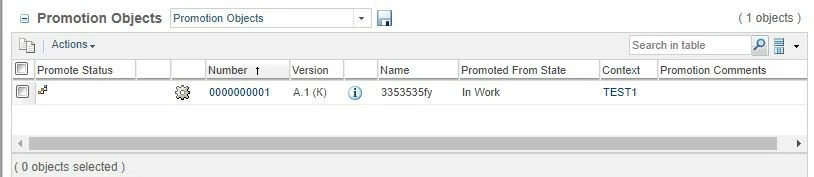
Hello everyone, please tell me how I can remove the column "Context" from the table "Promotion Object" and swap "Name" and "Number"?

DelEl.JPG


Best answer by ShirishMorkhade_238755

Hi @VladiSlav ,

@DmitryC is referring to below steps:

1. Go to Promotion Objects table and click on View drop downPromotionRequest.PNG


2. Click on Customize (extreme bottom option)

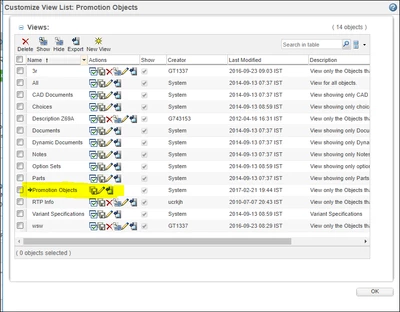
3. Click on Pencil icon next to the view you want to edit. Just like highlighted below:

view.PNG


4. New popup will be displayed.

5. Go to fourth wizards step "Set Column Display"

6. Remove Context field from "Selected Columns" table on right 

7. Save all the child wizards.


Hope this is clear now.


Regards,

Shirish

1 reply

14-Alexandrite
November 19, 2019

Hi VladiSlav,


Just hit that drop-down list and go into "Customize ...". Everything else should be pretty obvious. Just keep in mind that editing the default views require Site Admin privileges, but every user can create their own additional views with different columns, filters, sorting, and column order.


Kind Regards,

Dmitry.

VladiSlav17-PeridotAuthor
17-Peridot
November 20, 2019


@DmitryCplease specify in what settings it can be done? I went to Browse -> Customization -> Tools and Component Catalog, but did not find how to edit tables
16-Pearl
November 20, 2019

Hi @VladiSlav ,

@DmitryC is referring to below steps:

1. Go to Promotion Objects table and click on View drop downPromotionRequest.PNG


2. Click on Customize (extreme bottom option)

3. Click on Pencil icon next to the view you want to edit. Just like highlighted below:

view.PNG


4. New popup will be displayed.

5. Go to fourth wizards step "Set Column Display"

6. Remove Context field from "Selected Columns" table on right 

7. Save all the child wizards.


Hope this is clear now.


Regards,

Shirish