15-Moonstone
March 15, 2023
Question

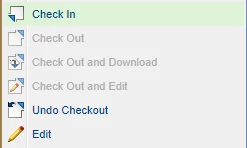
How do I restrict the Edit Button?

  • March 15, 2023
  • 2 replies
  • 1916 views

Hi Comunity;


In the TQM JISHUKEN A3 workflow, I want to restrict the users I want to check in and check out only and the edit button to them. How can I do that?
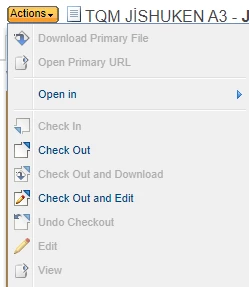
 

Screenshot_4.png

Screenshot_5.png


2 replies

avillanueva
23-Emerald I
23-Emerald I
March 15, 2023

I think we need a better english translation of what you are asking for. Are you saying that you want users to be able to check in and out but NOT be able to Edit? This then would also apply to Checkout and Edit combo action. Not sure what this accomplishes. Check and being able to modify and edit something go hand in hand. This is easily done with removing modify ACL. Can you explain better why you would want to change the OOTB behavior? 

smcvr15-MoonstoneAuthor
15-Moonstone
March 15, 2023

I don't know ACL. The reason I want this is because I have a 10-step process at hand.


In the process, the user initially (create) enters an accounting data and then loads an excel.


Then excel needs to be updated in steps 2,3,4 and 5.
However, the accounting data entered at the beginning should not be changed.


We want the accounting data to be changeable only by the accounting department.

That's the whole reason.


The alternative solution we have found now is;


We created one more of the attributes containing the accounting data, that is, we cloned them. With the code we wrote in the workflow, we transfer the initial attribute values to the ones we cloned and hide these cloned attributes from other users except the accounting department.

Thus, the attrbutes on the create screen and the edit screen are shopping with each other, but they do not buy in the same place.

18-Opal
March 15, 2023

Very doable.

A data utility could be implemented that compares the attribute values of the working copy (new iteration) to the previous iteration. If the values are not identical, return form error message to the user stating: “May Day! You’re not allowed to change he value(s) of <the attribute(s) they changed>.

A listener could be used to get the same affect.


Either way can limits the users that are allowed to make the changes based on your requirement.

joe_morton
18-Opal
18-Opal
March 27, 2023

I haven't done this myself, but the Windchill help says that you can apply restrictions to attributes by using Profiles. It looks like the attributes need to be created as Reusable Attributes.


See: http://support.ptc.com/help//wnc/r12.1.0.0/en/index.html#page/Windchill_Help_Center/profilemgmt/ProfileMgmtAttrVisibilitySet.html#
