

1-Visitor
December 8, 2016
Question

How enable dual sign functionality on Problem Report as shown in attched image.

  • December 8, 2016
  • 1 reply
  • 1630 views

Hi,

When i am going through Change management videos on YouTube , found below video "PTC Windchill PDMLink Change Process Webinar - YouTube".

In this they shows a Problem Report with Dual sign functionality, as per the presenter this is not customization, its configuration.

Is any one know how to enable dual sign in functionality as shown in below image ?

Here is the screen print from above video.
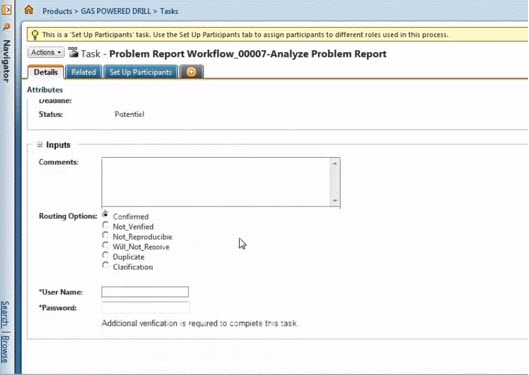
Dual Sign.jpg

Thanks,

Vivek

1 reply

16-Pearl
January 31, 2017

Hi Vivek Uchekar

Have you tried "Signing Required" in Workflow Template Administration?

signing.png

Regards,

Shirish

17-Peridot
January 31, 2017

If you want both the username and password you need to use the "FDA Compliant" Signature engine.  You can follow the directions here.  You also need to set Signature Required on your workflow activity as above.

http://support.ptc.com/cs/help/windchill_hc/wc102_hc/index.jspx?id=WFChp_ElectronicSigSetup&action=show