7-Bedrock
December 8, 2023
Solved

How Reload part number after lifecycle state change?

  • December 8, 2023
  • 1 reply
  • 2673 views

If Number is E-M030002 them remove E- after it goes to certain lifecycle  state

Best answer by HelesicPetr

Hi @MP_10719580 

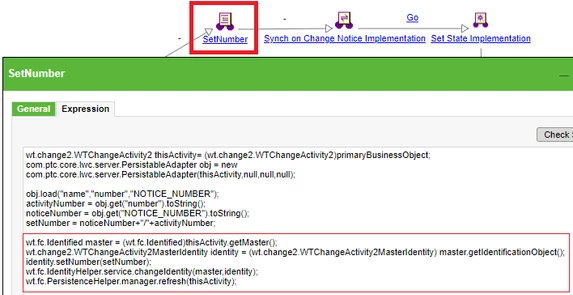
Here is example from WF Activity how to set number activity to a format "CN+/+AtivityNumber" 

HelesicPetr_1-1702305470159.png


wt.fc.Identified master = (wt.fc.Identified)thisActivity.getMaster();
wt.change2.WTChangeActivity2MasterIdentity identity = (wt.change2.WTChangeActivity2MasterIdentity) master.getIdentificationObject();
identity.setNumber(setNumber);
wt.fc.IdentityHelper.service.changeIdentity(master,identity);
wt.fc.PersistenceHelper.manager.refresh(thisActivity);


PetrH


1 reply

HelesicPetr
22-Sapphire II
22-Sapphire II
December 9, 2023

Hi @MP_10719580 

Set the Lifecycle template to advanced and run own workflow in the state where you need.

Place an expresion robot with code in the workflow.

Write code to change the number  in the WF .

PetrH

7-Bedrock
December 11, 2023

Can you give some references or examples?

HelesicPetr
22-Sapphire II
22-Sapphire II
December 11, 2023

Hi @MP_10719580 

Here is example from WF Activity how to set number activity to a format "CN+/+AtivityNumber" 

HelesicPetr_1-1702305470159.png


wt.fc.Identified master = (wt.fc.Identified)thisActivity.getMaster();
wt.change2.WTChangeActivity2MasterIdentity identity = (wt.change2.WTChangeActivity2MasterIdentity) master.getIdentificationObject();
identity.setNumber(setNumber);
wt.fc.IdentityHelper.service.changeIdentity(master,identity);
wt.fc.PersistenceHelper.manager.refresh(thisActivity);


PetrH