
1-Visitor
February 3, 2017
Question

How to add attribute Number in Project Title

  • February 3, 2017
  • 1 reply
  • 2525 views

Hello,

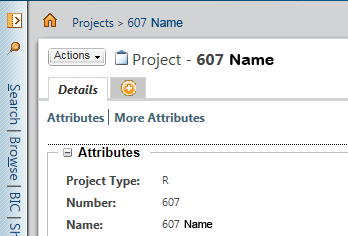
Can anyone help on how to add the default project attribute "Number" in the Title of the Project that by default shows only the Object type and the Name?

See the picture below:
Capture.PNG

Thank you in advance.

Regards

John

1 reply

15-Moonstone
February 6, 2017

Take a look at  http://www.ptc.com/cs/help/windchill_hc/wc102_hc/index.jspx?id=WCCG_UICust_InfoPages_InfoPages&action=show

Chapter Item Identifications Customization

Basicaly, you need to create a class to extend wt.identity.DisplayIdentification

and register this new delegate, with a line like

<Option cardinality="duplicate" order="1" requestor="wt.projmgmt.admin.Project2" serviceClass="ext.custom.MyCustomDelegate"/>

take a look at codebase/service.properties.xconf to get the full syntax to use in site.xconf.

By default, the project object implements the DisplayIdentification interface. But you can easily use your own implementation.

Sélection_169.png

1-Visitor
February 6, 2017

Thank you for your reply.

I will check it out and reply here.

I assume that in this way only the Projects and programs will be affected. Correct?

15-Moonstone
February 6, 2017

Yes, Program is a subtype of Project, so it's affected too.