

Solved
How to change order of states in a new promotion request Target Promotio State drop down list?
Version: Windchill 11.1
Use Case: I would like to reorder the Target Promotion state in the drop down list being shown for a New Promotion Request to match the order in the Life Cycle Template.
Description:
I have added custom states to our windchill install.
This is the order of the states in the life cycle template

This is the order they are showing up in the New Promotion Request drop down list
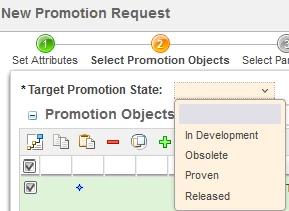
How do you change the order in the drop down list to match the Life Cycle Template?
I would like the drop down list to read as the following:
In Development
Proven
Released
Obsolete
Thanks for any help you may provide,
Don A
