12-Amethyst
September 25, 2023
Solved

How to change the standard workspace load rule for all users?

  • September 25, 2023
  • 1 reply
  • 799 views

Short question: How to change the standard workspace load rule "load as saved" to "load newest" for all users?



Best answer by HelesicPetr

Hi @MP_9215870 

one important point, folowing configuration does not affect function "Open in Creo"


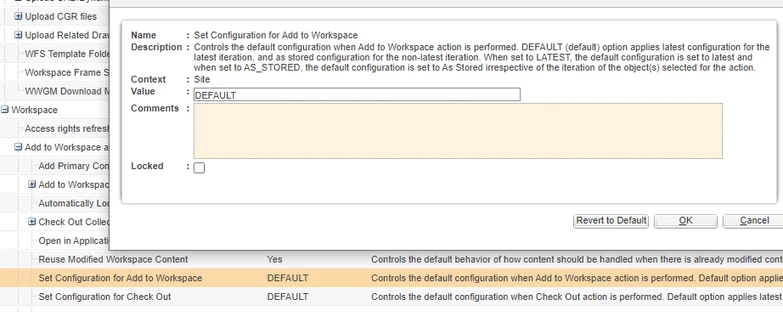
Set the preference on the site or org level to LATEST

"Set Configuration for Add to Workspace" or "Set Configuration for Check Out"

HelesicPetr_0-1695624307786.png

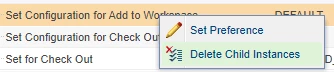
then delete all child instances, this resets all users configuration to the site level. 


HelesicPetr_1-1695624412203.png


PetrH

1 reply

HelesicPetr
22-Sapphire II
22-Sapphire II
September 25, 2023

Hi @MP_9215870 

one important point, folowing configuration does not affect function "Open in Creo"


Set the preference on the site or org level to LATEST

"Set Configuration for Add to Workspace" or "Set Configuration for Check Out"

HelesicPetr_0-1695624307786.png

then delete all child instances, this resets all users configuration to the site level. 


HelesicPetr_1-1695624412203.png


PetrH