1-Visitor
Sep 1, 2015 12:45 PM UTC
Question

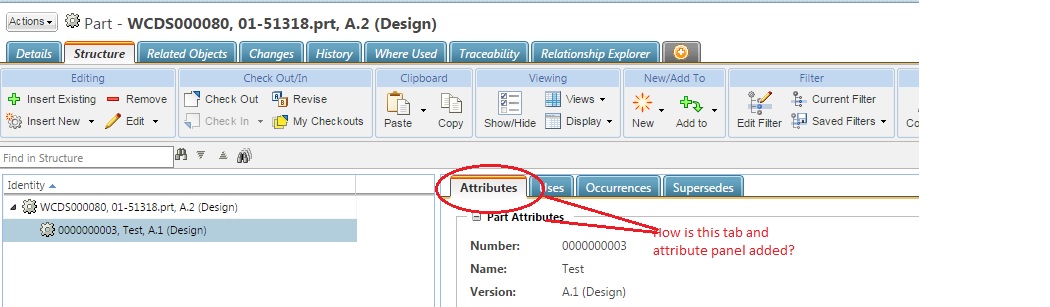
How to customize attribute panel in part usage PSB tabs?

How is the tab and attribute panel invoked? I can find action/model for it. Please check below screenshot!screen.jpg
7 replies

1-Visitor
Sep 4, 2015 4:39 PM UTC

Hi Praveen -

The attributes tab in PSB is "hard-coded" in the PSB Google Widget Toolkit (GWT) implementation, and there is no action for it like there is for the tabs at the top of the Info page. (at least in 10.2 M020)

You can customize the content of the attributes panel in PSB using layouts.  Attributes can be added, removed, or rearranged in the "Part Structure Attributes" layout found under the "Part" type (or sub-types) in the "Type and Attribute Management" utility.  See attached image for details.

structureAttributes.png

Translate
psampath1-VisitorAuthor
1-Visitor
Sep 7, 2015 6:43 AM UTC

Hi Todd,

            Thanks for the response. I was able to add attributes and rearrange them. I want to customizing an existing attribute. I tried adding a custom data utility from type and attribute manager. The datautility class is being invoked but getDataValue method is not being invoked. The getPlainDataValue method is invoked but overrding it leads to the attribute value being hidden in the UI. I basically want to override the State field and want to pass custom value there. Any pointers?

Translate
1-Visitor
Sep 8, 2015 3:59 PM UTC

Hi Praveen -

We ran into a similar issue.  Our solution was to override "getPlainDataValue" and have that return the custom GUI component from "getDataValue" (which returns a TextDisplayComponent)

Here is sample code from our implementation:

@Override

public Object getPlainDataValue(String arg0, Object arg1, ModelContext arg2) throws WTException {

    // Product Structure Browser "Attributes" panel calls this.

    LOG.debug("Entering " + this.getClass().getName() + ".getPlainDataValue");

    if(arg1 instanceof WTPart) {

        LOG.debug("Returning Custom getPlainDataValue");

        return getDataValue(arg0, arg1, arg2);

    } else {

        LOG.debug("Returning OOTB getPlainDataValue");

        return super.getPlainDataValue(arg0, arg1, arg2);

    }

}

Translate
1-Visitor
Jul 27, 2016 3:33 PM UTC

Hi all,

Interesting..

Can I add another tab - For eg., "Reference Documents" next to the "Supersedes" tab?

Also, we have made a sub type of configurable describe link that we use for some purpose, for namesake, if I call it as "ABC Link", Can I add this tab next to the "Supersedes" tab.

The idea is to avoid use switching tabs and thus use only the "Structure" main tab even for adding objects like "Reference DOcuments" or in my case "ABC Link"....

Thanks for your support!

Best Regards

Hari

Translate
1-Visitor
Apr 25, 2018 10:04 AM UTC

Hi Hari,


Have you a solution for your question ?


I have a similar request and no solution for now.


Thx

Nicolas

Translate
