


16-Pearl
March 29, 2022
Solved

How to Customize where used panel's

  • March 29, 2022
  • 2 replies
  • 9063 views

Hello everybody,
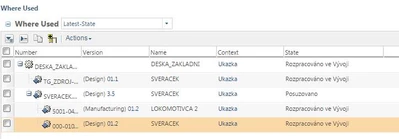
how can i add some attribute columns to the wtpart where used tab view?(see attachment)

Matteo.

Best answer by HelesicPetr

Hello @Matteo_1987 


You can add your own view by LoadFromFile


You just need to correct Admin user information in a attached xml file.

HelesicPetr_0-1648817835654.png


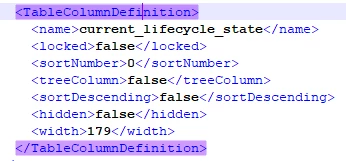
Define columns as needed. IBA values or system attributes.

Example how the column name should be defined in a xml load file you need to export some view from other tables where you can modify views. 
HelesicPetr_1-1648817857105.png


IBA definition is easier then system atribs you just use internal names.


Last thing is to load the xml file to Windchill by the windchill shell and the loadfromfile utility


windchill wt.load.LoadFromFile -u user-p pass -d TAG-TableViewDescriptor-0.xml


Hope this can help


Be sure to test it on a test server and also backup a system before any load .:D.


Best Regards


PetrH
 

HelesicPetr_2-1648818503519.png


2 replies

17-Peridot
March 29, 2022

You need to overwrite the OOTB table view.

com.ptc.windchill.enterprise.object.WhereUsedTableView

but it's not supported...


See also the archived idea

https://community.ptc.com/t5/Windchill-Ideas/Adding-extra-features-to-Where-Used-Tab/idi-p/460854

unfortunately not enough user voted for this idea

17-Peridot
March 30, 2022

We added the State column in 11.2.1.  The Where Used table is not a straightforward table as others, as it has two distinct modes - the Latest and All Revisions.   Latest is most like a normal table view, however in All Revisions all matching Revisions (latest on that revision) are show per row.  The challenge with the All Revisions view is finding an elegant way to show related attributes when multiple versions are seen in a readable and navigable format (eg still easily expand to parents / children without overwhelming the UI)


In the future we do plan to look at further attribute support for the Latest View.  For the All Versions we held some UX sessions with users and are still considering potential paths.  No current release timeline for this work at this time.

HelesicPetr
22-Sapphire II
22-Sapphire II
April 1, 2022

Hello @Matteo_1987 


You can add your own view by LoadFromFile


You just need to correct Admin user information in a attached xml file.

HelesicPetr_0-1648817835654.png


Define columns as needed. IBA values or system attributes.

Example how the column name should be defined in a xml load file you need to export some view from other tables where you can modify views. 

HelesicPetr_1-1648817857105.png


IBA definition is easier then system atribs you just use internal names.


Last thing is to load the xml file to Windchill by the windchill shell and the loadfromfile utility


windchill wt.load.LoadFromFile -u user-p pass -d TAG-TableViewDescriptor-0.xml


Hope this can help


Be sure to test it on a test server and also backup a system before any load .:D.


Best Regards


PetrH


HelesicPetr_2-1648818503519.png


16-Pearl
April 7, 2022

Hi Petr,

I tried to insert the files after modifying it (see attachment) but an error regarding the Container Path appears in the method server.

What am I doing wrong?


1.GIF

PS: what is the way to export the Where Used view format from my Windchilll?


ty,

Matteo

HelesicPetr
22-Sapphire II
22-Sapphire II
April 8, 2022

Hello @Matteo_1987 

can you show full error please?


there is Assert Failed. In my opinion the user admin is not correctly defined in your XML. 


there should be LDAP address in ufid.


I would export any table view from custom View List.

For example go to a product folder table. 

Open Customization window for the table

chose Site view created by admin (ootb)

use export button.

Check the ZIP File and open xml file where the user is defined. 


Use this user ufid in your custom where used xml definition


PetrH


HelesicPetr_0-1649404083952.png