
12-Amethyst
November 20, 2024
Solved

How to get subfolders via the REST API

  • November 20, 2024
  • 4 replies
  • 1857 views

Version: Windchill 12.1


Use Case: I need to traverse the folder structure in a Windchill Library via the REST API's


Description:

I see there are a few relevant API's. 

"/v6/DataAdmin/Containers('"+containerId+"')/Folders" provides us with a way to get the root folder, which I believe is pretty much always "/Default", but how do I get the list of folders in that folder, to recursively traverse the folder structure?

I see there is "/v6/DataAdmin/Containers('"+containerId+"')/Folders('"+folderId+"')" but that only gives me the information about the folder I already have the ID for and does not tell me what subfolders exist in that folder.
Best answer by AdamElkins

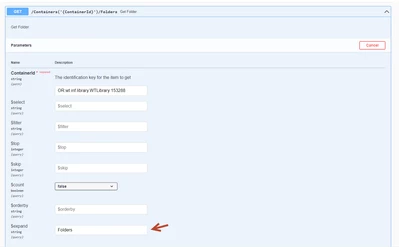
In order to get the subfolder in a given folder via the WRS REST API's, include the $expand parameter with a value of "Folders".

AdamElkins_0-1736542894787.png

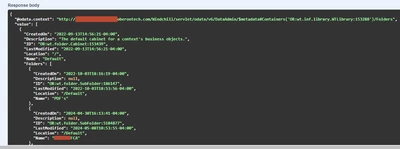
This causes the API to include a Folders objects as part of the JSON response and fills in each of the subfolders.

AdamElkins_1-1736542942031.png

Search the PTC Support site for Windchill REST Services User Guide for more information on the expand parameter.


4 replies

13-Aquamarine
November 26, 2024

Hi,

You need to use the '$expand' param. You need to build the expand param based on the level of the folder structure. 

Example:

tm4_0-1732660962012.png

In this case the folder path is "/default/MyFolder"


Thanks,

Thiagarajan


12-Amethyst
January 10, 2025

I am guessing you are right about the expand parameter, but what you suggested is not working for me. I get a URI is malformed error.

Community Manager
December 18, 2024

Hi @AdamElkins,


I wanted to see if you got the help you needed.

If so, please mark the appropriate reply as the Accepted Solution. It will help other members who may have the same question.
Of course, if you have more to share on your issue, please pursue the conversation. 


Thanks,
Anurag

12-Amethyst
December 18, 2024

Still looking into it, thanks.

AdamElkins12-AmethystAuthorAnswer
12-Amethyst
January 10, 2025

In order to get the subfolder in a given folder via the WRS REST API's, include the $expand parameter with a value of "Folders".

AdamElkins_0-1736542894787.png

This causes the API to include a Folders objects as part of the JSON response and fills in each of the subfolders.

AdamElkins_1-1736542942031.png

Search the PTC Support site for Windchill REST Services User Guide for more information on the expand parameter.


12-Amethyst
January 22, 2026

Any idea had to get the contents of the Subfolders? I get errors if I use the ID of the Subfolder.

12-Amethyst
March 11, 2025

It isn't obvious at all what needs to be done if you need to create a subfolder in one of these nested folders. The Create Folder json request appears not to work no matter what I try,

12-Amethyst
March 14, 2025

Yeah, I have found there are not a lot of good examples and it can be a challenge to figure out how to do what you need to.