1-Visitor
July 24, 2024
Solved

How to handle custom MVC table having rows of custom POJO object

  • July 24, 2024
  • 1 reply
  • 2811 views

I have custoom wizard in which I implemented MVC table. This table is having objects which are belonging to a custom POJO class. I want to retrieve values for each column (each column is aa POJO attribute). Once I get those all column values, I want to create an object of WTDocument type.I tried with objHandle but not succeeded. Can anyone help me with process of this implementation ?

Best answer by HelesicPetr

Hi @AKC_301264 

Your Windchill should use just one methodserver without bacground. 

If you use BG and MS then the configuration is more complicated that you have to set different ports to each method


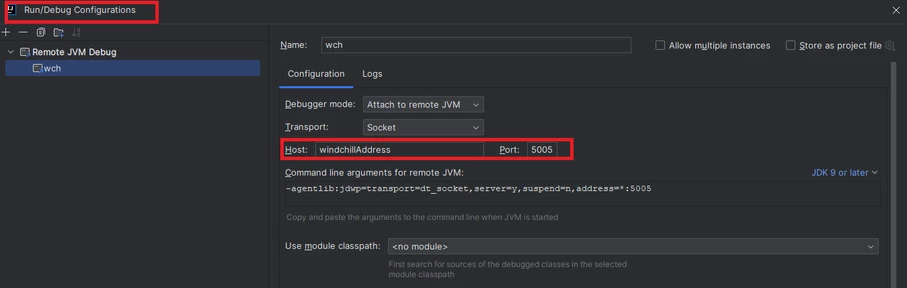
in InteliJ create new RemoteJVM Debug configuration set the address and port

HelesicPetr_0-1721999139009.png

Copy the Command line arguments for remote 

in my case

-agentlib:jdwp=transport=dt_socket,server=y,suspend=n,address=*:5005

set this arguments in the windchill wt.properties file by Windchill shell command. 

wt.manager.cmd.MethodServer.debug.args=-agentlib\:jdwp\=transport\=dt_socket,server\=y,suspend\=n,address\=5005


restart the method server.


Then you should be able to connect to the Windchill with debug mode from InteliJ.

HelesicPetr_1-1721999405564.png

HelesicPetr_2-1721999413979.png

HelesicPetr_0-1721999834789.png


PetrH

1 reply

HelesicPetr
22-Sapphire II
22-Sapphire II
July 25, 2024

Hi @AKC_301264 

What is your question? What API is used to create WTDocument? 

Or you do not know how to use NmComandBean object to get the row informations in the processor that process the wizard?

 If you can get all information from POJO objects then just create the WTDocument based on that information. 


code to create WTDocument


WTContainer container = getFolderByName(); // own function to search the folder to store
String typeDefstr = "wt.doc.WTDocument";

WTDocument retDocument = WTDocument.newWTDocument();
retDocument.setNumber(number);
retDocument.setName(name);
setDocType(retDocument, typeDefstr);

WTPrincipal currentuser = SessionHelper.getPrincipal();
WTOrganization org = currentuser.getOrganization();
if (org != null)
{
	retDocument.setOrganization(org);
}
if (container != null)
{
	retDocument.setContainer(container);
}
if (folder != null)
{
	FolderHelper.assignLocation(retDocument, folder);
}
//save ....
try
{
	retDocument = (WTDocument) PersistenceHelper.manager.store(retDocument);
} catch (WTException uni)
{
uni.printStackTrace();
}


PS> Knowledge base contains information that the NmCommandBean.getSelectedXXX returns only WTObject class if the POJO class is not set in the table definition

CS345786 - NmCommandBean.getSelectedXXX APIs don't work with POJO objects in Windchill PDMLink


PetrH

1-Visitor
July 25, 2024

Thanks for the reply Petr. I know the process for  new WTDocument. My challenge is that I am not sure how to use NmComandBean object to get the row informations in the processor that process the wizard.

For your information I am getting POJO data as below in my MVC table


AKC_0-1721898170311.png


From the above table, I can able to fetch value for Comments entered which is text area (column 5) , attached file (column 6) and selected action (combo box which is column 7). However I am not able to fetch columns 1 and 2 which are specific document's number and description respectively. 

Thanks for sharing the article https://www.ptc.com/en/support/article/CS345786?_gl=1*1tbg1t4*_gcl_au*MTMzNTI5MjQ4LjE3MjE1NjU5NDE.*_ga*MTIxMDI2ODU2OC4xNjc3NjYyNzc3*_ga_7NMP2MSYPM*MTcyMTg5NzQ1Ny4xMDguMC4xNzIxODk3NDU3LjYwLjAuMA..  I will go through it.


Regards,

AKC


HelesicPetr
22-Sapphire II
22-Sapphire II
July 25, 2024

Hi @AKC_301264 

It depends what object it is.

For example if the row is an object that is identified by number try to get the row object and use getter to get that information.. 


I guess that the object is just virtual and is not stored anywhere so

try to check the values of all getters from command bean in debug mode when you can stop the operation in IDE and check the actual real variables and data  that are pushed to the commandbean object.

getText
getComboBox
getTextArea
getChecked
HelesicPetr_0-1721899439151.png

PetrH