11-Garnet
September 4, 2020
Solved

How to have a history of users that download a document?

  • September 4, 2020
  • 3 replies
  • 4864 views

Hello all, I hope you are great.


Any of you know if is possible for a product manager to have a view of the users that downloaded a file?

What our product manager has in mind is a new tab in the document info where he can verify who download the document and maybe comments written by the user when the files was downloaded by the user.


Thank you in advance for any idea or suggestion?

Best regards

Luis Chavarría 
Best answer by d_graham

Luis,


Are you looking for something like this?

d_graham_0-1599573682974.png


When the *Download Report button is selected a Report opens that, in the background, has been automatically edited to use the object whose page was used to open the report as the search criteria.


Results can be whatever is required.  This is just to show it's doable.

d_graham_1-1599573729695.png

Results

d_graham_2-1599573974192.png


Thoughts?


David

3 replies

22-Sapphire I
September 6, 2020

The OTB Security Auditing allows for this.  Edit configAudit.xml to include the Download event.

Can view directly from Site, Util, Security Audit or create a qml report against the AUDITRECORD info in the dabase.

11-Garnet
September 7, 2020

Hello @MikeLockwood 


Thanks for taking your time answering me. I will try what you said, it seems promising. 


Thanks again.

Luis 

d_graham18-OpalAnswer
18-Opal
September 6, 2020

Luis,


Are you looking for something like this?

d_graham_0-1599573682974.png


When the *Download Report button is selected a Report opens that, in the background, has been automatically edited to use the object whose page was used to open the report as the search criteria.


Results can be whatever is required.  This is just to show it's doable.

d_graham_1-1599573729695.png

Results

d_graham_2-1599573974192.png


Thoughts?


David

11-Garnet
September 7, 2020

@d_graham  Thanks a lot,

This is what I was looking for. An easy way that the user could have a report of who download the file.


Again thanks a lot.

Luis 

18-Opal
September 7, 2020

Luis,


I think I came up with a better solution.

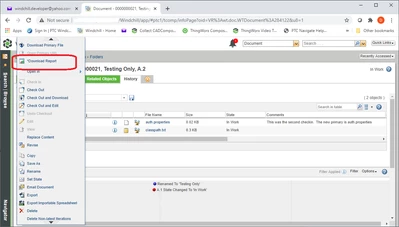
Still uses the button below as before but now the button opens a Report.

d_graham_0-1599525106885.png


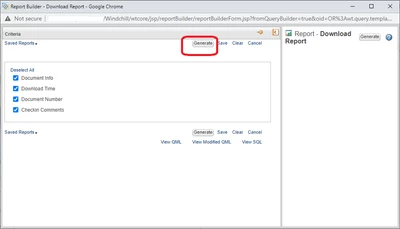
Report opens and user selects "Generate".  Note there are no inputs so the user can't go wrong.

The criteria inputs are automatically set based on the WTDocument so no need to even show them to the user.

d_graham_2-1599502173802.png

Or display optional data to be displayed and let the user choose.

In the example below username is NOT optional so it will always be displayed.

d_graham_1-1599569358524.png


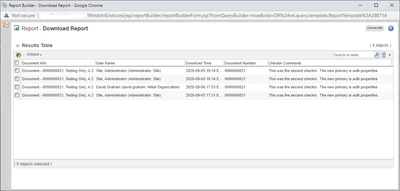
After selecting "Generate" the user gets the report.

d_graham_3-1599502287096.png

The nice part is you can edit the "Select" and "Order" part of the Report Template per your requirements.  Just don't touch the criteria part.

Once the tools is in place you don't need to be a developer to make these edits.  Any admin could do it.


Using this technique you could automatically edit and run a Report using ANY data that can be queried using (in this case) the WTDocument as a starting point to retrieve the input criteria (or any thing else in the report).


I think this has some interesting potential.


David

11-Garnet
October 29, 2020

Hello @d_graham . 

I was looking in my Windchill user and I can not find the Download Report option in the Action button. Do you have any advice? 


Best regards

Luis Chavarría


18-Opal
October 29, 2020

Luis,


The Download Report action is not standard.  It is a custom action that I created to demonstrate how this could be done.

If you're still interested let me know.


David