
18-Opal
Jun 25, 2026 9:46 AM UTC
Solved

I am looking for information related to the PublisherAction class.

I want to understand the behavior of the following API
PublisherAction publisherAction = new PublisherAction();
publisherAction.addAction(PublisherAction.POSASSY, true);
publisherAction.addAction(PublisherAction.PROCESSTYPE, "");
What is the difference when PublisherAction.POSASSY is set to true versus false? What is its purpose, and how does it affect the publishing process?
Also, what is the purpose of PublisherAction.PROCESSTYPE? What values can be passed to this parameter, and how do those values influence the publishing behavior?

HelesicPetr
22-Sapphire II
Jul 2, 2026 10:48 AM UTC

Hi ​@TDT 

Try it and you’ll see the difference.

Here is a help where the behavior of positioning assembly is described.

Configuring Publishing of Positioning Assemblies

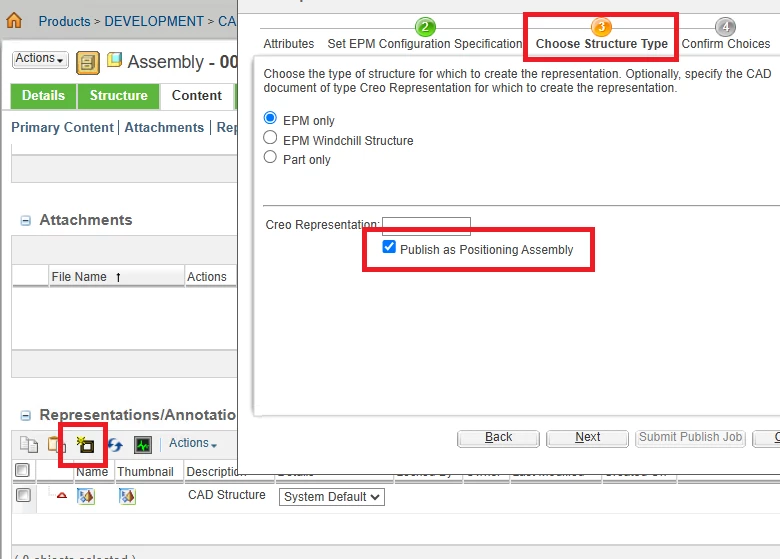
Generally the position assembly is used for a huge assemblies, where the visualization process can take more then 3 and more hours. The visualization is just collection of existing sub model visualizations

 Users UI example


The documentation  for the PublisherAction.PROCESSTYPE is clear isn’t it?

Value can be:

"0" - publish process marked out of date

(default) "1" - only publish ie. no mark out of date

"2" - only mark out of date, ie no publish

So it is up to your decision what type of publish process you use.  What you need.

Publish the visualization with some configuration and set as ”out of date”

or just publish

or just set existing visualization “out of date” 


PetrH

5 replies

Radwan Almsora
5-Regular Member
Jun 26, 2026 12:32 AM UTC

In PTC Windchill, the PublisherAction class allows developers to pass optional control parameters and rules to the Publisher.doPublish() method. These actions dynamically modify how assemblies, drawings, or CAD data are processed during visualization generation.

Translate
Radwan Almsora
Fadel
23-Emerald II
Jun 26, 2026 1:10 PM UTC

Take a look at  javadoc

 Windchill/wt/clients/library/api/com/ptc/wvs/common/ui/PublisherAction.html

Translate
Buiꓘa
TDT18-OpalAuthor
18-Opal
Jun 29, 2026 6:37 AM UTC

Hi ​@Fadel,

Thanks for the link.
I am still not clear on the behavior of the following process types:
"0" – Publish and mark out of date 
"2" – Only mark out of date
If PROCESSTYPE is set to 0, will it create a new representation and then mark the representation as Out of Date?
If PROCESSTYPE is set to 2, will it simply mark the existing representation as Out of Date without creating a new representation?
 

Translate
HelesicPetr
22-Sapphire II
Jul 2, 2026 10:48 AM UTC

Hi ​@TDT 

Try it and you’ll see the difference.

Here is a help where the behavior of positioning assembly is described.

Configuring Publishing of Positioning Assemblies

Generally the position assembly is used for a huge assemblies, where the visualization process can take more then 3 and more hours. The visualization is just collection of existing sub model visualizations

 Users UI example


The documentation  for the PublisherAction.PROCESSTYPE is clear isn’t it?

Value can be:

"0" - publish process marked out of date

(default) "1" - only publish ie. no mark out of date

"2" - only mark out of date, ie no publish

So it is up to your decision what type of publish process you use.  What you need.

Publish the visualization with some configuration and set as ”out of date”

or just publish

or just set existing visualization “out of date” 


PetrH

Translate