
1-Visitor
November 28, 2016
Question

Is there a way to add another workflow the list of workflows in the right click new menu?

  • November 28, 2016
  • 1 reply
  • 1482 views

I am wanting to add a custom workflow to the right click new menu.  Is there any way to that?  Thanks in advance!
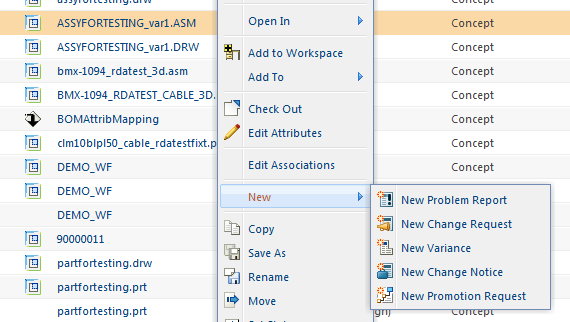
newworkflow.png

1 reply

17-Peridot
November 30, 2016

Please have a look at following case:

https://support.ptc.com/appserver/cs/view/solution.jsp?n=CS185927

  • To add a custom create action for Change Request soft type to folder Action > New sub menu
    • Create a subtype of Change Request

User-added image

  • Copy the action model folderbrowser_toolbar_new_submenu from <WT_HOME>/codebase/config/actions/FolderManagement-actionModels.xml to <WT_HOME>/codebase/config/actions/custom-actionModels.xml
  • Add the below line to the above copied model in custom-actionModels.xml<action   name="create"  type="AgendaCR" resourceBundle="ext.custom.ActionDefinitionsRB" />   <!-- New Agenda Type Change Request -->
  • In <WT_HOME>/codebase/config/actions/custom-actions.xml file added new object type for the subtype of Change Request.

<objecttype name="AgendaCR" class="wt.change2.WTChangeRequest2|com.ptc.ptcnet.AgendaCR" resourceBundle="ext.BWIR.ActionDefinitionsRB">

  • Create an resource bundle file to localize the created action
  • For example create ActionDefinitionsRB.java under WTHOME/src/ext/custom​

package ext.custom;
import wt.util.resource.*;
@RBUUID("ext.custom.ActionDefinitionsRB")
public final class ActionDefinitionsRB extends WTListResourceBundle {
    @RBEntry("New Agenda Change Request")
     public static final String PRIVATE_CONSTANT_1 = "AgendaCR.create.description";
    @RBEntry("NEW_ICON.gif") // <WT_HOME>/codebase/netmarkets/images
    public static final String PRIVATE_CONSTANT_2 = "AgendaCR.create.icon";
  }

  • Compile using the below command:

ant -f bin/tools.xml class -Dclass.includes=ext/custom/ActionDefinitionsRB.java

  • Make sure ActionDefinitionsRB.class is generated under <WT_HOME>/codebase/ext/custom
  • Stop Windchill Method Server
  • Clear Tomcat and Info*Engine cache
  • Restart Windchill Method Server
  • The new action should now be under to Action -> New menu as below

User-added image

  • Note: the image size must be smaller than 16*16 pixel and it should be placed inside <WT_HOME>/codebase/netmarkets/images directory.
  • Disclaimer : PTC recommends following best customization practices to avoid maintenance installation process overwrite. Please go through “5. Managing Customizations” chapter in Windchill Customization Guide.
EdSiekman1-VisitorAuthor
1-Visitor
December 9, 2016

Thanks for the reply Bjorn.  Really appreciate and looks like just what I am looking for but have not yet had a chance to try.  thanks again!
