

avillanueva
23-Emerald I
23-Emerald I
March 29, 2023
Solved

Likely very simple question about input on wizards

  • March 29, 2023
  • 1 reply
  • 1613 views

I have a very simple wizard when I just need to gather a text response from the user. I followed an example but must have missed something. My attribute panel appears but not the textbox I had expected. Here is what I see:
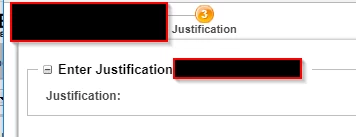
avillanueva_0-1680116900542.png

Here is the builder code that I used:

public AttributePanelConfig buildAttributesComponentConfig(ComponentParams arg0)
			throws WTException {
		
		 
		ComponentConfigFactory componentconfigfactory = getComponentConfigFactory();
		
		AttributePanelConfig attributeconfig = (AttributePanelConfig) componentconfigfactory.newAttributePanelConfig();
		attributeconfig.setComponentType(ComponentType.WIZARD_ATTRIBUTES_TABLE);
		JcaGroupConfig group=(JcaGroupConfig) componentconfigfactory.newGroupConfig();
		group.setId("justification");
		group.setLabel("Enter Justification");
		group.setIsGridLayout(true);
		JcaAttributeConfig attribute = (JcaAttributeConfig)componentconfigfactory.newAttributeConfig();
		attribute.setId("justification_value");
		attribute.setRequired(true);
		attribute.setLabel("Justification");
		attribute.setComponentMode(ComponentMode.EDIT);
		group.addComponent(attribute);
		attributeconfig.addComponent(group);
		return attributeconfig;
	}

I thought that all I needed was to set the component mode to edit. I did this before with a table but in that case I used a data utility to make a editable text box. Is that what I need to do here? This should just be a simple textbox where the user can enter a short few sentences and I can pass that to a workflow.

Best answer by BjoernRueegg

You need to set the exact component in the buildComponentData method. There you can define if the attribute is a textbox, textarea, checkbox, dropdown, etc.

 @Override
 public ComponentConfig buildComponentConfig(ComponentParams arg0) throws WTException {

 ComponentConfigFactory factory = getComponentConfigFactory();

 AttributePanelConfig attributePanelConfig = factory.newAttributePanelConfig();
 GroupConfig groupConfig = factory.newGroupConfig("customConfig");
 groupConfig.setLabel("Input");
 groupConfig.setRenderOnTop(true);

 AttributeConfig attributeConfig2 = factory.newAttributeConfig("textArea", "Input");
 groupConfig.addComponent(attributeConfig2);

 attributePanelConfig.addComponent(groupConfig);

 return attributePanelConfig;
 }


 @Override
 public Object buildComponentData(ComponentConfig config, ComponentParams params) throws WTException {

 Map guiMap = new HashMap();

 TextArea textarea = new TextArea();
 textarea.setName("textArea");
 textarea.setId("textArea");
 textarea.setValue(message);
 textarea.setEditable(false);
 textarea.setRichText(true);
 textarea.setEnabled(false);

 guiMap.put("textArea", textarea);

 return guiMap;
 }

1 reply

17-Peridot
March 29, 2023

You need to set the exact component in the buildComponentData method. There you can define if the attribute is a textbox, textarea, checkbox, dropdown, etc.

 @Override
 public ComponentConfig buildComponentConfig(ComponentParams arg0) throws WTException {

 ComponentConfigFactory factory = getComponentConfigFactory();

 AttributePanelConfig attributePanelConfig = factory.newAttributePanelConfig();
 GroupConfig groupConfig = factory.newGroupConfig("customConfig");
 groupConfig.setLabel("Input");
 groupConfig.setRenderOnTop(true);

 AttributeConfig attributeConfig2 = factory.newAttributeConfig("textArea", "Input");
 groupConfig.addComponent(attributeConfig2);

 attributePanelConfig.addComponent(groupConfig);

 return attributePanelConfig;
 }


 @Override
 public Object buildComponentData(ComponentConfig config, ComponentParams params) throws WTException {

 Map guiMap = new HashMap();

 TextArea textarea = new TextArea();
 textarea.setName("textArea");
 textarea.setId("textArea");
 textarea.setValue(message);
 textarea.setEditable(false);
 textarea.setRichText(true);
 textarea.setEnabled(false);

 guiMap.put("textArea", textarea);

 return guiMap;
 }
HelesicPetr
22-Sapphire II
22-Sapphire II
March 30, 2023

Hi @avillanueva @BjoernRueegg 

I have more complicated solution 😄

Define own Data Utility for the attribute and you can return what component type you wish  . 


@BjoernRueegg thank you for the experience.

I used buildComponentData to get objects in a table but I didn't know it is possible to use it for the AttributePanelConfig 😄 


Thanks 


PetrH