1-Visitor
January 20, 2020
Solved

Not all contexts are displayed in Set Location during Move operation

  • January 20, 2020
  • 2 replies
  • 3559 views

Hi,


I would like to move WTParts to a different context and/or folder but when I try to select a different context location in the Move operation, only two of the several contexts display in the Set Location drop down.


With Policy Administration I have added Full Control for wcadmin on the Root domain for All Contexts but does not work. Still only the two contexts get displayed.
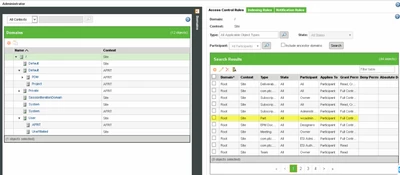
 

Pieter_Du_Toit_0-1579527021160.png


Where in the configuration am I missing something?


Please assist.


Thank you 
Best answer by DmitryC

Hi Pieter,


I think I know the reason for this behavior.


Having rights to a context and seeing it on the list are two different things.


Here is an example:

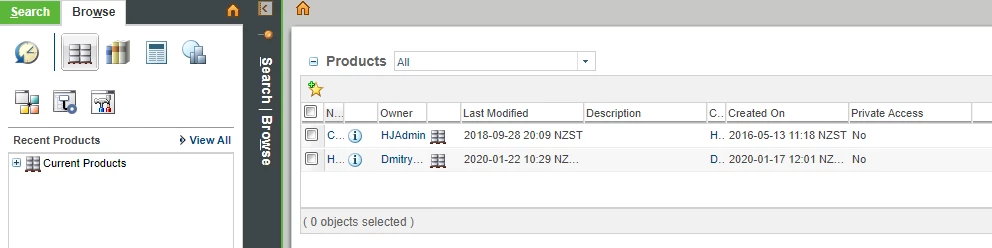
We do not use the wcadmin account directly, instead, we are using a bunch of named accounts for people who have site admin access, therefore wcadmin didn't open any contexts, except for the initial one. Currently, we have 4 products and 1 library, but they are not on the list:

Products list wcadmin.PNG


If I will do an advanced search for the products - I will find them all, and I will have full access to them, and as soon as I will open them at least once - they will appear in the recent list, but not in the products list.


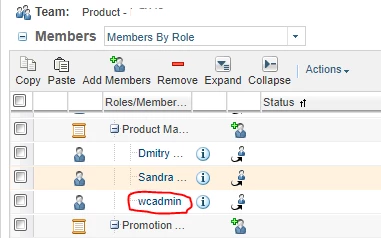
To add products to the list you will have to explicitly add users into the product team. Almost any role in a product will do the job, and we have dedicated groups/role just for ensuring visibility:

Context Team.PNG


Give it a try and see if it helps.


Kind regards,

Dmitry.


2 replies

1-Visitor
January 20, 2020

@Pieter_Du_Toit 

I think wcadmin might need to be added to Org Admins.  Also it may not be a member of those Context teams.  Just a couple easy things to check.


James

1-Visitor
January 22, 2020

Hi,


Will do the checks and see what happens.


Regards

1-Visitor
January 22, 2020

When I go to my Products list I see only two. They are the only products available for selection during Set Location for the Move Operation.


Pieter_Du_Toit_0-1579676147266.png

There is however a whole list of products that needs to show up during Set Location.


Pieter_Du_Toit_1-1579676237804.png


If I check correctly I should have have Full Control for the Concept JS product. What am I missing? Is there a reason for it not showing in my Products list and thus it is not available during Set Location?


Pieter_Du_Toit_2-1579676447680.pngPieter_Du_Toit_3-1579676483963.png


Appreciate your assistance.


14-Alexandrite
January 22, 2020

Hi Pieter,


Just remember that you have to have enough access in both the source and the destination contexts to move an object. This may fall apart quickly if any of the contexts are created as 'private', or if you have 'deny' permissions anywhere.


What I would do in your place:

1. Create parts in both contexts in the same state

2. Go into 'Edit Access Control' and hit the 'i' icon to see the full list of all policies that govern the access control to a given object.

3. Check that you are granted with appropriate access and nothing restricts it explicitly. 

permissions.png


Kind regards, 

Dmitry.

1-Visitor
January 22, 2020

Thank you.


I will take the various steps and see if I am successful.


Regards