
12-Amethyst
October 16, 2023
Solved

Query Builder Help - How to fill a column when condition is true

  • October 16, 2023
  • 1 reply
  • 2668 views

I am creating a report listing task details.

One of the columns in this report is for the "Completed Date" of a task.


I need help implementing a condition for the "Completed Date" column. The condition is:

          If "Work Item.Status" equals "Completed"

               then populate the "Completed Date" with "Wf Assignment. Last Modified",

          else, leave "Completed Date" null/blank.


How can I go about accomplishing this?
Should I create two reports? If so, how do I merge the reports to see both completed and uncompleted tasks?
Is this something that is done under the "Select or Constrain" tab or under the "Criteria" tab? 

TIA!


Best answer by mariaSutton

Hi again,

I was able to figure out what was missing. When I would run the report an error was getting thrown about an invalid number.
The result that "Work Item.Status" returns is not a string or a number, its a enumerator. 
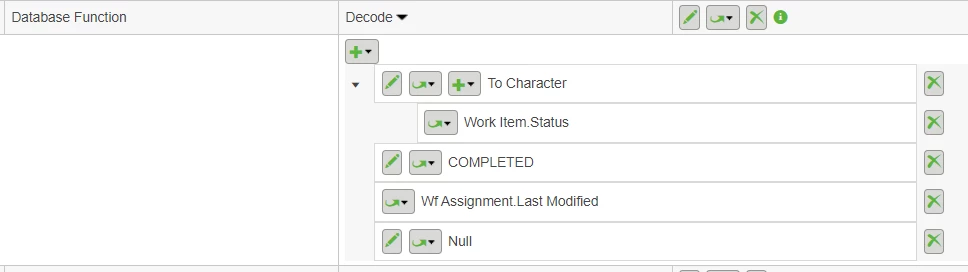
I was able to add a Database function of "To Character" then under that "Work Item.Status". 
After doing this the first value under Database "Decode" can be compared to the second arg which is a string value of "COMPLETED".

MR_10589254_0-1697555750304.png


1 reply

14-Alexandrite
October 16, 2023

Use the "DECODE" database function.


Name the column "Completed Date"

First argument to be "Work Item.Status" (what you're evaluating)

Second argument to be "Completed" (the value you are looking for)

Third argument to be "Wf Assignment.Last Modified" (the value you want to display if the value you're evaluating matches the one you're looking for, i.e. arg2 = arg1.value

Fourth argument to be blank text string (the value to return if the value in arg2 not found as value of arg1


Link to WC Help database function: Database Functions


Hope that helps!

12-Amethyst
October 16, 2023

Hi @aaronjlarson,

Thanks for your reply. I am trying out what you described but cannot get a result. Can you let me know if this looks right?

These are the steps I did:

  1. Under Select or Contrain tab, selected Database Function
    1. In Add Database Function modul/popup form
      • Display Name = Completed Date
      • Database Function = Decode
      • Operator = equals
      • Value = Constant value
      • 1.PNG
    2. Under Decode dropdown
      1. Add Reportable Item "Work Item. Status"
      2. Add Constant String "Completed"
      3. Add Reportable Item "Wf Assignment.Last Modified"
      4. Add Constant String "" (blank)
      5. 2.PNG
mariaSutton12-AmethystAuthorAnswer
12-Amethyst
October 17, 2023

Hi again,

I was able to figure out what was missing. When I would run the report an error was getting thrown about an invalid number.
The result that "Work Item.Status" returns is not a string or a number, its a enumerator. 
I was able to add a Database function of "To Character" then under that "Work Item.Status". 
After doing this the first value under Database "Decode" can be compared to the second arg which is a string value of "COMPLETED".

MR_10589254_0-1697555750304.png