
12-Amethyst
March 21, 2024
Solved

Read a WTPart and change his Number and WTDocuments (with the same info code) using JAVA

  • March 21, 2024
  • 5 replies
  • 4966 views
Some one know how to get programatically de EPMDocuments associated(s) to a WTPart?
 
What's the task:
 
1 Verifying if my WTPart is new and have a family field filded (i created a rule that the new WTParts have a "WC_" prefix this is working).
1.1 Been a WTPart, i need to change his Name and Number by a code getting by a ERP endpoint (it´s not working but i simulated). I able make it with some inside lines code on "workflow template" (didn't like, but could't work with java unit - and i'll had a new dificult ahead, i know it).
1.2 And need change the EMPDocument(s) too, if exists ones of (like .prt, .drw or .asm), with the same code getting by ERP.
Here is my problem. I couldn't get the objects with Java or code inside template (yet). Tryed a lot of java codes, but get a lot problems with "jar imports" that is not recognized.
2. And at last, if is not new or don´t has a specific family, do nothing (it´s working).
 
I has found a lot of solutions inverse, and try change the logical way without sucess.
 
If someone you have some code, config, idea or some trick to do this, i appreciate.
 
Thank you!
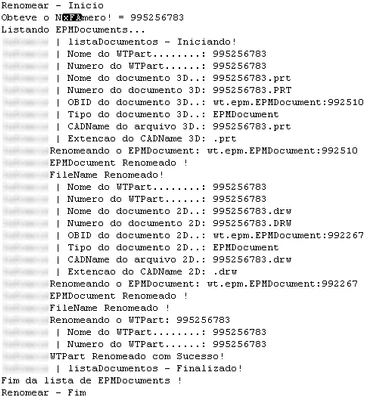
Best answer by FabioValente

Hi, just to Close this Topic. I was able to solve the problems.


Follow a image from the right results 

image.png

Thank you all. 


5 replies

avillanueva
23-Emerald I
23-Emerald I
March 22, 2024

Confused and there is a lot to unpack here. Your title mentioned WTDocuments but then talked about EPMDocument. If you are looking at changing name and numbers, that's easy and that code can be looked up to change identity. Finding related WTDocs or EPMDocuments is also possible but might involve some business rule for your install. Generally, WTDocs are linked as DescribeBy or ReferenceBy links. EPMDocuments are accessible via the EPMBuildRule but drawings are a complicating factor since there is the "calculated link". I would rephrase with one part of your project that you are currently needed help on and break up your posts.


As an aside, I have a rename listener in place for years that propagates name changes from Part to model to drawing. Utilizes a queue task to process the changes.

12-Amethyst
March 22, 2024

Hi, thank you for response.

You're right! I did a little mistake.

I need to work with EPMDocuments (the drawings). So i'll need to use a queue task, there is no other way?

Follow my litte code that rename my WTPart (working)

wt.part.WTPart part = (wt.part.WTPart) p;
wt.part.WTPartMaster partMaster = (wt.part.WTPartMaster) part.getMaster();

wt.part.WTPartMasterIdentity newIdentity = (wt.part.WTPartMasterIdentity) partMaster.getIdentificationObject();

newIdentity.setName("NewName"); // here is a sample (that i'll get from ERP endpoint (not tested yet)
newIdentity.setNumber("NewName");

wt.fc.IdentityHelper.service.changeIdentity(partMaster, newIdentity);

Thank you

12-Amethyst
March 25, 2024

I getting some evolution.


public boolean isAssociated(WTPart wtPart, EPMDocument epmDocument) throws WTException {
	if (wtPart == null || epmDocument == null) {
		return false;
	}

	// Obtém os IDs do WTPart e EPMDocument
	String wtPartId = PersistenceHelper.getObjectIdentifier(wtPart).toString();
	String epmDocumentId = PersistenceHelper.getObjectIdentifier(epmDocument).toString();

	// Compara os IDs para verificar se são iguais
	return wtPartId.equals(epmDocumentId);
}

// above the code tha compares if the EPMDocument is associated to my atual Part.

// And the code i'm getting the CADDocuments and his view (JPG image)
	wt.epm.navigator.relationship.AssociatedCADDocs relationship = new AssociatedCADDocs();
	relationship.setTypes(wt.epm.navigator.relationship.AssociatedCADDocs.Type.CALCULATED_BUILD);
	wt.fc.collections.WTCollection parts = new wt.fc.collections.WTHashSet();
	parts.add(wtPart);
	wt.fc.collections.WTKeyedMap partToDocs = wt.epm.navigator.EPMNavigateHelper.navigate(parts, relationship, wt.epm.navigator.CollectItem.SEED_ID, wt.epm.navigator.CollectItem.OTHERSIDE).getResults(new wt.fc.collections.WTKeyedHashMap());
	Iterator iterator = partToDocs.keySet().iterator();
	while(iterator.hasNext()) {
		Object key = iterator.next();
		Object value = partToDocs.get(key);
		if (isAssociated(wtPart, partToDocs)) {
			System.out.println("Chave: " + key + ", Valor: " + value);
		// Here i got stucked, cause i can't compare or get all data from the EPMDocument.
		}
	}


But still getting errors. Someone get any idea to solve this?
Thank you.

18-Opal
March 26, 2024

@FabioValente 

Why are you returning


String wtPartId = PersistenceHelper.getObjectIdentifier(wtPart).toString();
	String epmDocumentId = PersistenceHelper.getObjectIdentifier(epmDocument).toString();
return wtPartId.equals(epmDocumentId);

This will always return false.


Also, toString() doesn’t buy you anything.

If two objects are not equal toString() will also be not equal.  Likewise if the two objects are equal toString() will also be equal.

12-Amethyst
March 26, 2024

@d_graham I'm trying to compare the name's.


Simplifying, it's about a integration with a ERP.


trying verify if my 3D - CAD (Part-.prt or Assemly - .asm) exists and has the same name that WTPart .


And then i need to compare the 2D object too, if the Drawing (.drw) exists and has the same name that WTPart.


If 3D and/or the 2D has the "old" name (windchill auto-named) , i need rename all the ones (WTPart, 3D and 2D) with a code returned from ERP.


I did can rename the WTPart using a WorkFlow Template code (that i don't like it), but if i couldn't find any better, just this is working until now.


But the 3D and 2D it's more difficult. I'm trying a code that expecting a WTPart and get only a ObjectReference, and the Drawnings that i expecting a EPMDocument i'm getting a WTHashSet...

Thank you!

12-Amethyst
March 26, 2024

I'm able to get 2D EPMDocuments with this code:

public static void listaDocumentos(WTPart wtPart) throws WTException, WTPropertyVetoException {
		List<EPMDocument> documents = new ArrayList<EPMDocument>();
		AssociatedCADDocs relationship = new AssociatedCADDocs();
		relationship.setTypes(AssociatedCADDocs.Type.IMPLICIT);
		List<Object[]> epmDocs = EPMNavigateHelper.navigate(wtPart, relationship, CollectItem.SEED_ID, CollectItem.OTHERSIDE).getRawResults();
		
		if(epmDocs != null) {
			for (Object[] objects : epmDocs) {
				for (Object o : objects) {
					if (o instanceof EPMDocument) {
						documents.add((EPMDocument) o);
					}
				}
			}
		}
		
		// Iterar sobre a lista de documentos e imprimir seus nomes e tipos
		for (EPMDocument doc : documents) {
			String documentName = doc.getName(); // Obtém o nome do documento
			String documentType = doc.getClass().getSimpleName(); // Obtém o tipo do documento
			
			System.out.println("Nome do documento: " + documentName);
			System.out.println("Tipo do documento: " + documentType);
		}
	}

My WTPart has three related files, two .PRT files (the original has one but i added another one to test if i can get only the need one) and one .DRW
But the code above return two files. Boths are 2D, and one it's right one, and another was associated to another WTPart. It's one of the things i'm trying to avoid with the another code comparing the names of the objects related.
And i can`t get the 3D`ones with.
There are other way? Some trick or hint?
I tryed a lot of codes differents and without sucess.

Thank you again.

18-Opal
March 26, 2024

@FabioValente 


I’ll, assume (and I hate doing that) , that the CAD Doc is linked to the WTPart and you just want to make sure all the “names” of these linked objects are identical.


If this is the issue, it should be quite simple to check\correct this.


I was asked to develop some that if and of the objects, WTPart, Cad Model or Cad Drawing were renamed the other two objects would automatically be renamed. The idea was to automatically have the names always in sync.

12-Amethyst
March 27, 2024

@d_graham Thank you for response.


Yes, some like that. I need get a code from ERP and rename :
1. The WTPart (work on workflow expression)
2. The 3D CAD (if exists)
3. The 2D Draw (if exists)

I'm tried run some codes, but getting error with wt.identity and othres.
Tried some workflow codes, but here i got stuck with a lot of problems, cause i try return a list of files (2D and 3D) - and i added a second 2D to simulate the list return, but can't read on other side.

And for now, i can't get the 3D ones.

Thanks for attention


12-Amethyst
March 27, 2024

News about the development. Now i'm getting both right file names, 2D and 3D.


FabioValente_1-1711573925606.png


It´s in my language (portuguese) but you can see i getting the .PRT and .DRW 

My challenge is rename them! If anyone can help me, i appreciate.

FabioValente12-AmethystAuthorAnswer
12-Amethyst
May 3, 2024

Hi, just to Close this Topic. I was able to solve the problems.


Follow a image from the right results 

image.png

Thank you all.