15-Moonstone
December 21, 2023
Solved

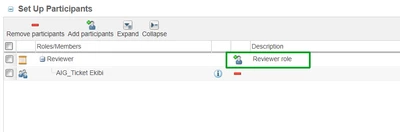
Set Up Participants tableWhen I search to add participants in the Set Up Participants table, it give

  • December 21, 2023
  • 1 reply
  • 2779 views

Hi Community;


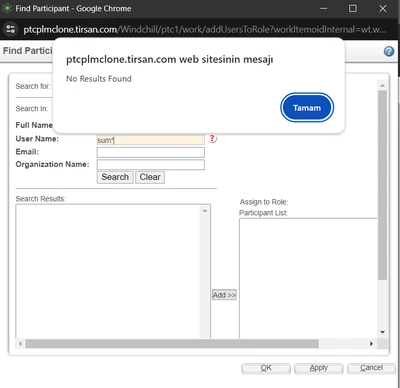
When I search to add participants in the Set Up Participants table, it gives a "No Result Found" warning. How can I show Windcihll users in the search when adding participants.


How can I fix this situation?
 

smcvr_0-1703166880771.png  

smcvr_1-1703166903458.png


Best answer by HelesicPetr

Hi @smcvr 

You need to modify the workflow template and set the participant options in that task.

It is last tab of the task editor.

You can define what the task owner can set there and what users can be set to the roles. 

PetrH 


1 reply

Fadel
23-Emerald I
December 21, 2023

are you sure there are users matching the search criteria  

Buiꓘa
smcvr15-MoonstoneAuthor
15-Moonstone
December 22, 2023

Hi @Fadel ,

When I add a user to the role in the screen below, they can search, but when I add it this way, all users will appear in the Set Up Participants table, and I do not want this to appear.


smcvr_0-1703222737446.png


16-Pearl
December 22, 2023

Hi,

What is your criteria for which users should be offered as Selection? 

Is that ECR and ECN you are working on?


Rgds

Hari