

11-Garnet
July 31, 2025
Solved

Table for Configurable Parent links

  • July 31, 2025
  • 1 reply
  • 409 views

Version: Windchill 13.0


Use Case: We have several Configurable Reference Links connecting various types of Parts and Documents. When we have added the different objects to a Part, we would also like to be able to see on the object which Part the object is connected to.


Description:

Somehow I don't see the linked objects in the Reference Parent Objects table and I can't seem to find any help on the issue.
Have I lost something in the setup? (Reference Links can easily be created and attribute values passed over)
Any good leads on this?

Best answer by Fadel

Can you add some screenshots , I don't really follow you 


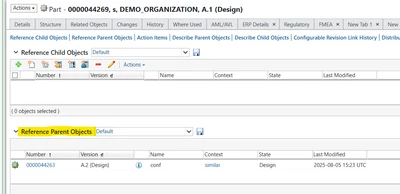
if you add a child configurable reference link object , on the given object you can see the parent object : 

Fadel_0-1754407550105.png


1 reply

Fadel
Fadel23-Emerald IAnswer
23-Emerald I
August 5, 2025

Can you add some screenshots , I don't really follow you 


if you add a child configurable reference link object , on the given object you can see the parent object : 

Fadel_0-1754407550105.png


Buiꓘa
11-Garnet
August 6, 2025

Examining the documentation once again I found the issue.

When you create the Child tables for the different links, you also have to create the Parent tables for the same links, in order to see the parent objects from the child object.

After editing all files again and adding Parent tables to the different links, all is working.

It's actually a very powerful tool.

Headlines can be edited for clarity (There seems to be a limitation on the number of characters for headlines, but that needs more investigation!)

Part-part, part-document and document-part relationships can be established and attributes can be made on the link and attribute values can be extracted from the linked objects with Alias attributes.