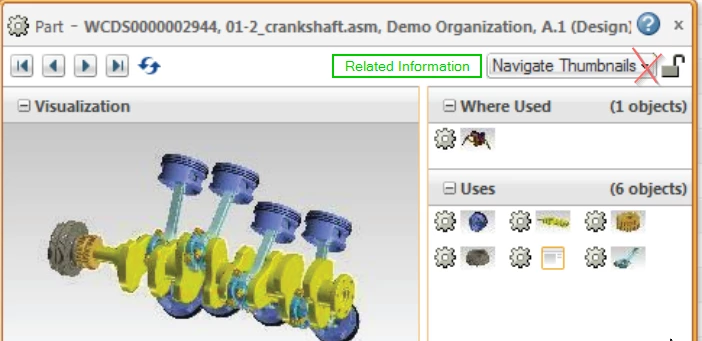
Use Case: How to customize the Thumbnail Navigator in order to show the buttons 'navigate Thumbnails' and 'Related Information' besides each other and not as in the ootb-way where one hides the other?
Description:
Since either 'Related Information' or 'Navigate Thumbnails' is constantly hidden and users (!) don't remember what they don't see, I wanted to make both buttons visible at the same time, as alternatingly pressed/unpressed buttons. Small fix, huge transparency improvement.
Well, the question is now about which file to customize...?
It seems to end up all in the huge ...netmarkets/javascript/util/ext-and-extensions.js , but I suspect that this is not the 'real' source which we would want to customize...
I also think it's not 'officially' supported for customization, but nevertheless the layout must be defined somewhere...
--- path\codebase\netmarkets\javascript\util\jsfrags\infopage\miniNavigator_ptc_formatted.jsfrag
+++ path\codebase\netmarkets\javascript\util\jsfrags\infopage\miniNavigator.jsfrag
@@ -122,7 +122,8 @@
 use3D: true, // setting
 getRef: "", // setting, make "&ref=1" to get reference objects
 height: 428, // Default height of the popup window height of internal +6 for spacing +26 for vispanel title header
- width: 486, // Default width of the popup window
+ // width: 486, // Default width of the popup window
+ width: 686, // Default width of the popup window

 getHelp: function () {
 PTC.help.openHelpWindow(WVSPopup.helpUrl);
@@ -462,11 +463,16 @@
 }
 }

+// DEV hide this menu per css
 PTC.miniNavigator.getTitleMenuConfig = function () {
 var actionsMenu = PTC.attributeHelper.get("ActionsMenu");
 //this has to map the same id as defined in RenderInfoPageModelTag in getDataValue for nmActions.
 var defaultText = bundleHandler.get("com.ptc.core.ui.navigationRB.MININAVTHUMBPANE");
 var menuButton = {
+ style: {
+ // hide the menu
+ display: "none",
+ },
 xtype: "dynamicMenuButton",
 cls: "miniNavTitle",
 id: PTC.miniNavigator.menuTitleID,
@@ -668,12 +674,58 @@

 /* Card Manager for right side pane in miniinfo*/
 var miniCardManager = {
- id: PTC.miniNavigator.cardManager,
+ // hide it via id not associated but still execute it, since it is needed
+ // id: PTC.miniNavigator.cardManager,
 layout: "card",
 region: "center", //cannot set autoscroll here (will cause double scrollbar in Chrome). its already set on whereusedPanel/relatedInfopanel
 activeItem: 0,
 portalManager: portalManager,
 items: [whereusedPanel, relatedInfoPanel],
+ };
+
+ // DEV make a combined panel, but this breaks some of the functionality in the ui
+ // important to define this _after_ var portalManager
+ var combinedPanel1 = {
+ id: PTC.miniNavigator.cardManager,
+ xtype: "panel",
+ region: "center",
+ layout: "hbox",
+ layoutConfig: {
+ align: "stretch", // stretch children vertically
+ },
+ defaults: {
+ border: false,
+ },
+ items: [
+ {
+ // LEFT COLUMN (Navigate Thumbnails)
+ id: "in_combinedPanel1_1",
+ xtype: "panel",
+ layout: "fit",
+ flex: 1, // take half of available width
+ style: "padding-right:0; border-right: 1px solid #d1d3d4;",
+ items: [miniCardManager.items[0]],
+ },
+ {
+ // RIGHT COLUMN (Related Info)
+ id: "in_combinedPanel1_2",
+ xtype: "panel",
+ layout: "fit",
+ flex: 1, // take the other half of the width
+ bodyStyle: "overflow-x:hidden;",
+ style: "padding-left:0; border-left: 1px solid #d1d3d4;",
+ // DEV workaround via https://stackoverflow.com/a/22376259
+ // directly add css here which selects and styles the _generated_ DOM
+ html: [
+ '<style type="text/css">',
+ "#in_combinedPanel1_2 .x-panel-body.x-panel-body-noheader.x-column-layout-ct",
+ // "{height: 100%; overflow-x:hidden; overflow-y:scroll !important;}",
+ "{height: 100%; overflow-x:hidden; overflow-y:scroll !important;}",
+ "</style>",
+ ].join("\n"),
+ items: [miniCardManager.items[1]],
+ },
+ ],
 };

 var dynamicDocPanel = {
@@ -830,7 +882,9 @@
 },
 ],
 },
- miniCardManager,
+ // miniCardManager,
+ // DEV add a new panel which contains both mini navigator and related info
+ combinedPanel1,
 ],
 });
 WVSPopup.win.on("afteraction", PTC.miniNavigator.onAfterAction);
@@ -875,6 +929,7 @@
 },
 items: [
 {
+ // DEV this contains EACH panel in the relatedinfo panel: caddocs, changes, etc.
 id: PTC.miniNavigator.relatedInfoColumn,
 xtype: "miniNavPortalColumn",
 },
@@ -1751,6 +1806,8 @@
 */
 PTC.miniNavigator.isRelatedWidgetPaneOpen = function () {
 var cardManager = Ext.getCmp(PTC.miniNavigator.cardManager);
+ // DEV return true always in order to display the panel always
+ return true;
 return cardManager.layout.activeItem.id === PTC.miniNavigator.relatedInformation;
 };
thanks a lot for the fast reply! Yes, miniNavigator.jsfrag contains all those UI stuff. Looking at it gives me some headaches as I am not an extjs expert or even close...😇
But then I had the idea to simply display both panes at the same time, always. This could maybe done quite simply by making the container pane contain both panes one besides each other. My first tries were unsuccessful, but I will take a look at it again...
--- path\codebase\netmarkets\javascript\util\jsfrags\infopage\miniNavigator_ptc_formatted.jsfrag
+++ path\codebase\netmarkets\javascript\util\jsfrags\infopage\miniNavigator.jsfrag
@@ -122,7 +122,8 @@
 use3D: true, // setting
 getRef: "", // setting, make "&ref=1" to get reference objects
 height: 428, // Default height of the popup window height of internal +6 for spacing +26 for vispanel title header
- width: 486, // Default width of the popup window
+ // width: 486, // Default width of the popup window
+ width: 686, // Default width of the popup window

 getHelp: function () {
 PTC.help.openHelpWindow(WVSPopup.helpUrl);
@@ -462,11 +463,16 @@
 }
 }

+// DEV hide this menu per css
 PTC.miniNavigator.getTitleMenuConfig = function () {
 var actionsMenu = PTC.attributeHelper.get("ActionsMenu");
 //this has to map the same id as defined in RenderInfoPageModelTag in getDataValue for nmActions.
 var defaultText = bundleHandler.get("com.ptc.core.ui.navigationRB.MININAVTHUMBPANE");
 var menuButton = {
+ style: {
+ // hide the menu
+ display: "none",
+ },
 xtype: "dynamicMenuButton",
 cls: "miniNavTitle",
 id: PTC.miniNavigator.menuTitleID,
@@ -668,12 +674,58 @@

 /* Card Manager for right side pane in miniinfo*/
 var miniCardManager = {
- id: PTC.miniNavigator.cardManager,
+ // hide it via id not associated but still execute it, since it is needed
+ // id: PTC.miniNavigator.cardManager,
 layout: "card",
 region: "center", //cannot set autoscroll here (will cause double scrollbar in Chrome). its already set on whereusedPanel/relatedInfopanel
 activeItem: 0,
 portalManager: portalManager,
 items: [whereusedPanel, relatedInfoPanel],
+ };
+
+ // DEV make a combined panel, but this breaks some of the functionality in the ui
+ // important to define this _after_ var portalManager
+ var combinedPanel1 = {
+ id: PTC.miniNavigator.cardManager,
+ xtype: "panel",
+ region: "center",
+ layout: "hbox",
+ layoutConfig: {
+ align: "stretch", // stretch children vertically
+ },
+ defaults: {
+ border: false,
+ },
+ items: [
+ {
+ // LEFT COLUMN (Navigate Thumbnails)
+ id: "in_combinedPanel1_1",
+ xtype: "panel",
+ layout: "fit",
+ flex: 1, // take half of available width
+ style: "padding-right:0; border-right: 1px solid #d1d3d4;",
+ items: [miniCardManager.items[0]],
+ },
+ {
+ // RIGHT COLUMN (Related Info)
+ id: "in_combinedPanel1_2",
+ xtype: "panel",
+ layout: "fit",
+ flex: 1, // take the other half of the width
+ bodyStyle: "overflow-x:hidden;",
+ style: "padding-left:0; border-left: 1px solid #d1d3d4;",
+ // DEV workaround via https://stackoverflow.com/a/22376259
+ // directly add css here which selects and styles the _generated_ DOM
+ html: [
+ '<style type="text/css">',
+ "#in_combinedPanel1_2 .x-panel-body.x-panel-body-noheader.x-column-layout-ct",
+ // "{height: 100%; overflow-x:hidden; overflow-y:scroll !important;}",
+ "{height: 100%; overflow-x:hidden; overflow-y:scroll !important;}",
+ "</style>",
+ ].join("\n"),
+ items: [miniCardManager.items[1]],
+ },
+ ],
 };

 var dynamicDocPanel = {
@@ -830,7 +882,9 @@
 },
 ],
 },
- miniCardManager,
+ // miniCardManager,
+ // DEV add a new panel which contains both mini navigator and related info
+ combinedPanel1,
 ],
 });
 WVSPopup.win.on("afteraction", PTC.miniNavigator.onAfterAction);
@@ -875,6 +929,7 @@
 },
 items: [
 {
+ // DEV this contains EACH panel in the relatedinfo panel: caddocs, changes, etc.
 id: PTC.miniNavigator.relatedInfoColumn,
 xtype: "miniNavPortalColumn",
 },
@@ -1751,6 +1806,8 @@
 */
 PTC.miniNavigator.isRelatedWidgetPaneOpen = function () {
 var cardManager = Ext.getCmp(PTC.miniNavigator.cardManager);
+ // DEV return true always in order to display the panel always
+ return true;
 return cardManager.layout.activeItem.id === PTC.miniNavigator.relatedInformation;
 };
Translate
Windchill Satisfaction Survey
Help shape the future of Windchill. Take our 5-minute survey and share your feedback.