
7-Bedrock
January 9, 2024
Solved

Unable to see label of action created in action framework

  • January 9, 2024
  • 1 reply
  • 14705 views

Hi,


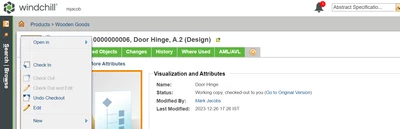
I am unable to see label when I create one action in Parts details page.

Action is there, it is clickable and the link opens. But can not see the label name.
 

DS_10805287_0-1704780942060.png

I created CustomAction.java file in actionFramework package

package actionFramework;


import wt.util.resource.*;


@RBUUID("actionFramework.CustomAction")

public class CustomAction extends WTListResourceBundle {


@RBEntry("Open In Google")

public static final String Google_Des = "custom.openInGoogle.description";


}



Best answer by HelesicPetr

Hi @Divyanshi 

If you change RBInfo file, you always need to restart the system.

Also with deleting a temp files. 

You had done something wrong if your "Open in" text disappeared. 

if you user RB info define all following sets label, description, tooltip

PetrH

1 reply

HelesicPetr
22-Sapphire II
22-Sapphire II
January 9, 2024

Hi @Divyanshi 

Have you restart the server? Or have you used a reload actions? HelesicPetr_1-1704786137262.png


There is no issue, you just need to set a label in the custom-actions that the name is shown.

I use your config and I don't have any problem with the action

HelesicPetr_0-1704786078101.png

<action name="openInGoogle">
<description>Open In Google</description>
<label>
	Open In Google
</label>
<command windowType="popup" url="https://www.google.com/" />
</action>

PetrH

Divyanshi7-BedrockAuthor
7-Bedrock
January 9, 2024

I'm trying this. Hope this time it works for me.