
14-Alexandrite
August 31, 2023
Solved

Upgraded from Windchill 11.0 to 12.1 cannot use custom XSL stylesheet

  • August 31, 2023
  • 2 replies
  • 1327 views

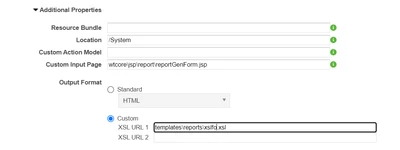
Here's an odd one. We just upgraded from Windchill 11.0 to 12.1 and one of the custom reports is not working. After some investigating, it appears that the report only works using the default XSL file "templates\reports\xslfo.xsl" for the custom URL. Changing the name to anything else results in a report not loading correctly. Anyone know what is causing this? I currently have a support ticket open, but progress seems to be very slow.
 

Aaronm87_0-1693505046425.png


Best answer by Aaronm87

Finally got this sorted out. In case anyone has this in the future here is how to fix it.


It appears that the properties didn't exist in the Windchill 11 install, but for some reason exist in Windchill 12. To create additional reports tech support gave me the following xconf command to run. Just replace <custom filename> with the name of the file you wish to use.


xconfmanager -s wt.services/svc/default/wt.util.xml.xslt.extn.ExtensionFunctionDefinitionDelegate/<custom filename>.xsl/java.lang.Object/0=com.ptc.windchill.xsl.extn.ExtensionFunctionDefinitionsReportTemplate/duplicate -t codebase\service.properties -p


2 replies

HelesicPetr
22-Sapphire II
22-Sapphire II
September 1, 2023

Hi @Aaronm87 \


What is the another name? there is a XSL file and if you change the name, there needs to be the correct named file. 

So if you have upgraded system, you should have copied the custom files from source system. 


PetrH

Aaronm8714-AlexandriteAuthor
14-Alexandrite
September 1, 2023

Literally any other name will no work. If I make a copy of the xslfo.xsl file and rename it to xslfo1.xsl and change the XSL URL, I receive an error and the PDF does not generate. The files were copied over from the source system.

Aaronm8714-AlexandriteAuthorAnswer
14-Alexandrite
January 9, 2024

Finally got this sorted out. In case anyone has this in the future here is how to fix it.


It appears that the properties didn't exist in the Windchill 11 install, but for some reason exist in Windchill 12. To create additional reports tech support gave me the following xconf command to run. Just replace <custom filename> with the name of the file you wish to use.


xconfmanager -s wt.services/svc/default/wt.util.xml.xslt.extn.ExtensionFunctionDefinitionDelegate/<custom filename>.xsl/java.lang.Object/0=com.ptc.windchill.xsl.extn.ExtensionFunctionDefinitionsReportTemplate/duplicate -t codebase\service.properties -p