
15-Moonstone
March 25, 2021
Question

View Rule Conflicts Hyperlink missing on task and to be enabled

  • March 25, 2021
  • 1 reply
  • 3689 views

Hi All,


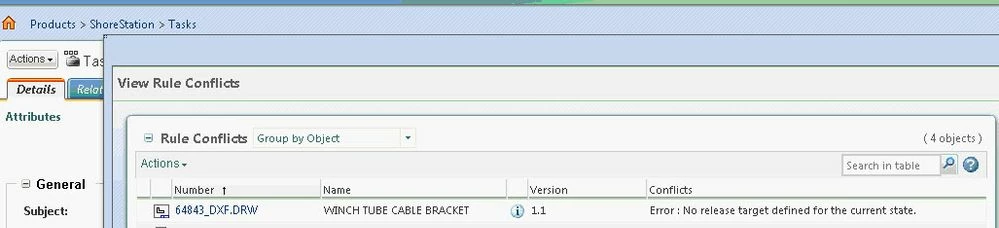
Can someone please tell me how to get the View Rule Conflicts to hyperlink to be enabled on a task so that the user can click on it and see the error and fix the same?


Please find a sample screenshot below
 

29132008_gePY.jpg

This is required for Windchill 11.0 M030


So kindly let me know if any leads are there.

1 reply

aachanta15-MoonstoneAuthor
15-Moonstone
March 26, 2021

Hi All,


Any leads on  how to get the View Rules Conflict link added to any task ?


23-Emerald IV
March 26, 2021

You shouldn't have to do anything to add them.  They are already built into the out of the box native task form templates and can be seen in the promotion request approval process.


TomU_0-1616770380968.png


TomU_1-1616770440784.png


TomU_2-1616770773484.png


aachanta15-MoonstoneAuthor
15-Moonstone
March 27, 2021

Hi Tom,


I do have exactly the same values in the Resolve Business Rules Conflict activity. But still, it is not showing VIEW RULES CONFLICT?


I checked three workflows one the OOTB and the other two custom promotion request workflows wherein in all the cases the Template Format is JSP and Template Name is Default. The variables are also the same as mentioned in the screenshot. But then the View Rules Conflict is appearing in the OOTB and in only one custom workflow and not in another custom workflow. There are no custom task form templates wherein all the workflows be it both OOTB or custom workflows they are using the same native task form template and the view rules conflict link is not being shown in the custom workflow. 


The workflow is just custom. But all activities or tasks are out of the box. 


Please find the below screenshots of the workflow

Rbcs.PNG


RBC.PNG


Variables are as below


variables.PNG


A task generated without View Rules Conflict Hyperlink 


task.PNG


Template


template.PNG


So can you please confirm if anything else is missing and that needs to be modified so that the hyperlink appears in the task for the custom workflow's ootb task?